> For the complete documentation index, see [llms.txt](https://handbook.musescore.org/llms.txt). Markdown versions of documentation pages are available by appending `.md` to page URLs; this page is available as [Markdown](https://handbook.musescore.org/pt_br/alternative-notation/mensural-notation-and-mensurstrich.md).
# Notação mensural e Mensurstrich
## Adding a mensural time signature to your score
Para aplicar sinais mensurais a uma partitura, você precisa adicionar primeiro uma [assinatura de compasso](/pt_br/notation/rhythm-meter-and-measures/time-signatures.md) convencional, depois modificar sua exibição substituindo-a pelo símbolo mensural apropriado na caixa de diálogo [Propriedades da assinatura de compasso](/pt_br/notation/rhythm-meter-and-measures/time-signatures.md#time-signature-properties). Observe que esses sinais são apenas decorativos; não é possível modificar a razão de duração entre diferentes valores de nota, e a assinatura de compasso subjacente permanece inalterada.
## Using mensural note symbols
\[A ser adicionado]
* adicionar da paleta de símbolos, ocultar
## Working with non-metered music
Música antiga, como música coral renascentista, pode ser escrita sem linhas de compasso ou assinatura de compasso. Isso pode ser conseguido no MuseScore da seguinte forma:
1. Configure os instrumentos ou vozes da partitura da maneira usual (Veja [Configurando sua partitura](/pt_br/basics/setting-up-your-score.md));
2. Ocultar a assinatura de compasso;
3. in `Format`→`Style`→`Score`, check the box titled "Display note values across measure boundaries";
4. Right-click on a measure in the top staff and select [Staff/Part properties](/pt_br/notation/instruments-staves-and-systems/staff-part-properties.md);
5. Desmarque "Mostrar linhas de compasso"; repita isso para cada pauta aplicável (veja a nota);
6. Click `OK`.
**Nota**: No passo 4 você pode tornar as linhas de compasso invisíveis selecionando tudo e pressionando `V`.
Observe que a partitura ainda se comporta como se as medidas estivessem presentes. [Propriedades de medida](/pt_br/notation/rhythm-meter-and-measures/measure-properties.md) podem ser aplicadas se necessário.
## Working with Mensurstrich
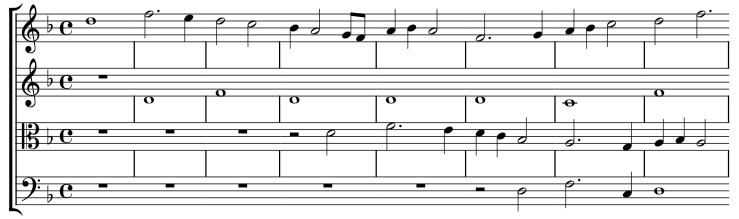
*Mensurstrich* é uma forma de notação moderna de música antiga em que as linhas de compasso são desenhadas *entre* as pautas ao invés de atravessá‑las:
### Adding barlines between staves
1. Right click on the bottom staff of the intended *mensurstrich* system, and select [Staff/Part properties](/pt_br/notation/instruments-staves-and-systems/staff-part-properties.md#staff-properties). Uncheck "Show barlines".
2. Selecione a primeira (não a de início!) linha de compasso para *cada* uma das pautas restantes;
3. Marque a caixa "Abranger para a próxima pauta" na seção **Linha de compasso** do painel **Propriedades**;
4. Ajuste "Abranger de" para definir a posição superior de cada linha de compasso;
5. Press `Set as staff default`;
## Displaying note values across measure boundaries
1. From the menu bar, select `Format`→`Style`→`Score`;
2. Marque "Exibir valores de nota através das fronteiras de medida".
## See also
---
# Agent Instructions
This documentation is published with GitBook. GitBook is the documentation platform designed so that both humans and AI agents can read, navigate, and reason over technical content effectively. Learn more at gitbook.com.
## Querying This Documentation
If you need additional information that is not directly available in this page, you can query the documentation dynamically by asking a question.
Perform an HTTP GET request on the current page URL with the `ask` query parameter, and the optional `goal` query parameter:
```
GET https://handbook.musescore.org/pt_br/alternative-notation/mensural-notation-and-mensurstrich.md?ask=&goal=
```
`ask` is the immediate question: it should be specific, self-contained, and written in natural language.
`goal` is optional and describes the broader end goal you are ultimately trying to accomplish on behalf of the user. GitBook uses it to tailor the answer towards what is most useful for that goal.
The response will contain a direct answer to the question and relevant excerpts and sources from the documentation.
Use this mechanism when the answer is not explicitly present in the current page, you need clarification or additional context, or you want to retrieve related documentation sections.