> For the complete documentation index, see [llms.txt](https://handbook.musescore.org/llms.txt). Markdown versions of documentation pages are available by appending `.md` to page URLs; this page is available as [Markdown](https://handbook.musescore.org/pl/notation/repeats/repeat-signs.md).
# Repetycje
A **repeat sign** looks like a double [barline](/pl/notation/rhythm-meter-and-measures/barlines.md) with a dot above and below the center line of the staff (see image below). It is used to enclose repeated sections of the score.
## Adding repeat signs to your score
Find repeat signs in the **Repeats & jumps** and **Barlines** [palettes](/pl/customization/palettes.md).
Place a start repeat barline at the beginning of the repeated section and an end repeat barline at the end:
If the start of the repeat section coincides with the beginning of the piece there is no need for a start repeat barline.
For repeated sections with multiple endings, use [voltas](/pl/notation/repeats/voltas.md).
## Changing how often to repeat
Unless indicated otherwise, a repeated section is played through twice.
To change the number of times a section is repeated:
1. Select the end repeat barline of the section.
2. Open the **Properties** panel.
3. Change the value of **Play count** to the number of times you wish the section to be played.
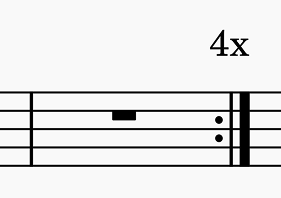
This will be reflected in playback, and also a textual indication will appear above the barline, for example:
#### Customizing play count text
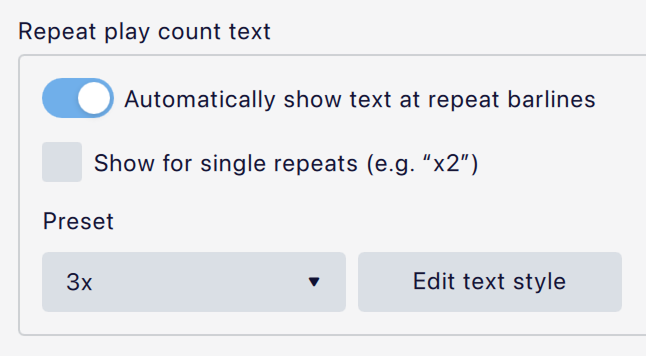
The text that appears above the repeat can be configured in **Format -> Style... -> Repeats -> Repeat play count text**:
* **Automatically show text at repeat barlines:** This toggle controls whether this text should appear at all in the score.
* **Show for single repeats:** If checked, the text will also appear above repeats with a play count of 2.
* **Preset:** This dropdown gives several options for the format of the text ('x3', '3x', 'Play 3 times', '3 repeats').
* The **Edit text style** button takes you to the page where the **Repeat play count** text style is configured.
Play count text is a type of [system marking](/pl/notation/instruments-staves-and-systems/instruments-and-system-markings.md#managing-system-markings), and can be shown (or hidden) wherever there is a system marking instance in the score.
You can customize the behavior for any specific end repeat barline in the score via the **Properties** panel. See [#repeat-properties](#repeat-properties), below.
## Ignoring repeats during playback
To ignore all repeats during playback:
* Click the cog icon in the [playback toolbar](/pl/sound-and-playback/playback-controls.md).
* Uncheck **Play repeats**.
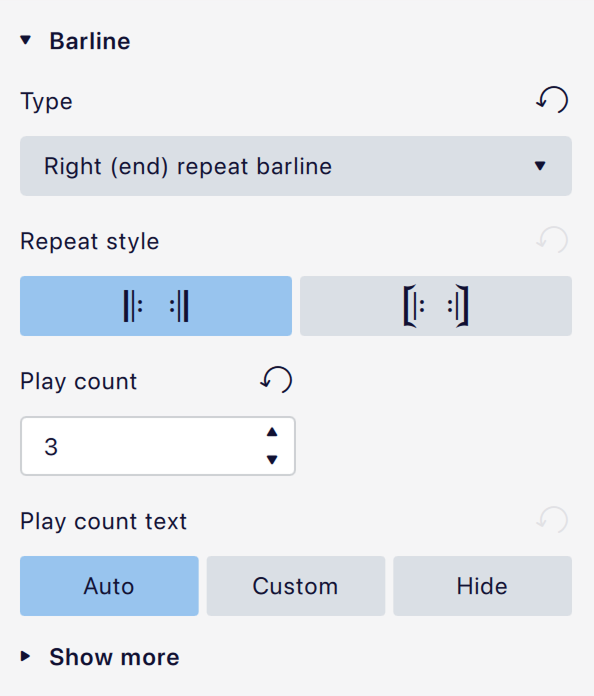
## Repeat properties
* **Repeat style:** Either the 'plain' or 'winged' style.
* **Play count:** The number of times to repeat (see [#changing-how-often-to-repeat](#changing-how-often-to-repeat), above).
* **Play count text** (which may be disabled depending on the value of **Play count** and the score's [style settings](#customizing-play-count-text)) has three options:
* **Auto:** Whether to show the text, and how to format it, is also determined by the score's style settings.
* **Custom:** Provides a text field where you can enter any text you wish, to override the default. You can also [edit the text](/pl/text/entering-and-editing-text.md#editing-text-object-content) directly in the score and **Custom** will be automatically selected.
* **Hide:** Do not show play count text on this repeat.
For the other settings under **Show more**, see [#barline-properties](/pl/notation/rhythm-meter-and-measures/barlines.md#barline-properties).
## Repeat style
Style settings for repeat barlines can be found in **Format -> Style -> Barlines**:
The settings specific to repeat barlines are:
* **Show repeat barline tips:** Adds 'wings' above and below repeat barlines.
* **Repeat barline to dots distance:** The distance between the innermost line of a repeat barline and its dots.
For the other settings, see [#barline-style](/pl/notation/rhythm-meter-and-measures/barlines.md#barline-style).
---
# Agent Instructions
This documentation is published with GitBook. GitBook is the documentation platform designed so that both humans and AI agents can read, navigate, and reason over technical content effectively. Learn more at gitbook.com.
## Querying This Documentation
If you need additional information that is not directly available in this page, you can query the documentation dynamically by asking a question.
Perform an HTTP GET request on the current page URL with the `ask` query parameter, and the optional `goal` query parameter:
```
GET https://handbook.musescore.org/pl/notation/repeats/repeat-signs.md?ask=&goal=
```
`ask` is the immediate question: it should be specific, self-contained, and written in natural language.
`goal` is optional and describes the broader end goal you are ultimately trying to accomplish on behalf of the user. GitBook uses it to tailor the answer towards what is most useful for that goal.
The response will contain a direct answer to the question and relevant excerpts and sources from the documentation.
Use this mechanism when the answer is not explicitly present in the current page, you need clarification or additional context, or you want to retrieve related documentation sections.
.png?alt=media)