> For the complete documentation index, see [llms.txt](https://handbook.musescore.org/llms.txt). Markdown versions of documentation pages are available by appending `.md` to page URLs; this page is available as [Markdown](https://handbook.musescore.org/nl/notation/pitch/octave-lines.md).
# Octaaflijnen
## Overzicht
**Octaaf** (**Ottava**) lijnen worden gebruikt om aan te geven dat een muziekstuk één of meer octaven boven of onder de aangegeven toonhoogte moet worden gespeeld; de lijn kan stippellijn of doorgetrokken lijn zijn:
8--------┐of 8va--------┐: Speel een octaaf hoger dan de aangegeven toonhoogte.\
8--------┘of 8va--------┘: Speel een octaaf lager dan de aangegeven toonhoogte.
8va alta/bassa-lijnen komen vooral veel voor in pianopartituren, hoewel ze soms ook in andere instrumentale muziek worden gebruikt. 15ma alta (2 octaven hoger) en 15ma bassa (2 octaven lager) worden ook af en toe gebruikt.
MuseScore past het afspelen van de partituur onder de ottava automatisch aan de juiste toonhoogte aan.
Ottava-lijnen zijn te vinden in het **Lijnen** [palet](/nl/basics/using-the-palettes.md).
## Een octaaflijn toevoegen aan de partituur
Zie [Een lijn toevoegen aan de partituur](/nl/notation/expressive-markings/other-lines.md#adding-a-line-to-your-score).
Om het bereik en de verticale positie van de lijn aan te passen, zie [Elementen rechtstreeks aanpassen](/nl/basics/adjusting-elements-directly.md).
## Octaaflijn eigenschappen
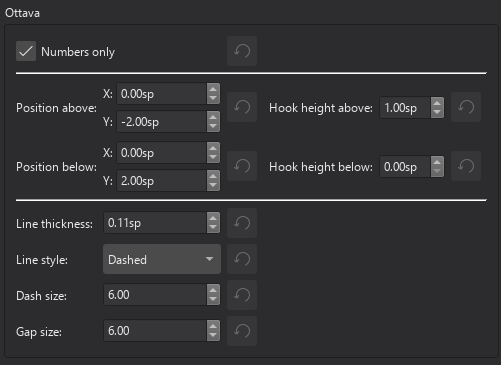
Eigenschappen die specifiek zijn voor de geselecteerde ottava(s) kunnen worden aangepast in het **Ottava** gedeelte van het [Eigenschappen](/nl/basics/properties-panel.md) paneel, namelijk:
### Stijl tabblad
**Type**: Specificeert of de Ottava-lijn 8va, 8vb enz. is.\
**Alleen nummers**: Verbergt alle tekst (zoals "va").\
**Lijn zichtbaar**: Maakt de lijn zichtbaar/onzichtbaar. Tekst blijft ongewijzigd.\
**Sta diagonaal toe**: Sta toe dat de lijn schuin loopt indien nodig.
Voor andere eigenschappen in dit tabblad, zie [Lijn eigenschappen](/nl/notation/expressive-markings/other-lines.md#line-properties).
### Tekst tabblad
Dit heeft een vergelijkbare gebruikersinterface als algemene lijnen (zie [Lijn eigenschappen](/nl/notation/expressive-markings/other-lines.md#line-properties)), maar gebruikt speciale code om de ottava-tekst te specificeren.
## Octaaflijn stijl
De standaardeigenschappen voor ottava's kunnen worden aangepast in `Opmaak`→`Stijl`→`Ottava's`.
---
# Agent Instructions
This documentation is published with GitBook. GitBook is the documentation platform designed so that both humans and AI agents can read, navigate, and reason over technical content effectively. Learn more at gitbook.com.
## Querying This Documentation
If you need additional information that is not directly available in this page, you can query the documentation by asking a question.
Perform an HTTP GET request on the following URL with the `ask` and `goal` query parameters:
```
GET https://handbook.musescore.org/nl/notation/pitch/octave-lines.md?ask=&goal=
```
`ask` is the immediate question: it should be specific, self-contained, and written in natural language.
`goal` is what the user is ultimately trying to achieve, the reason they need the answer. Sharing it helps GitBook give you a better, more relevant answer. A goal is most helpful when it describes the outcome the user wants rather than restating the question. For example, with `ask=how do I create an API token`, a goal like `automate deployments from our CI pipeline` lets GitBook tailor the answer to that use case.
The response will contain a direct answer to the question and relevant excerpts and sources from the documentation.
Use this mechanism when the answer is not explicitly present in the current page, you need clarification or additional context, or you want to retrieve related documentation sections.