> For the complete documentation index, see [llms.txt](https://handbook.musescore.org/llms.txt). Markdown versions of documentation pages are available by appending `.md` to page URLs; this page is available as [Markdown](https://handbook.musescore.org/it/notation/expressive-markings/breaths-and-pauses.md).
# Breaths and pauses
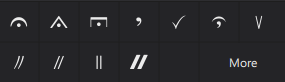
Breaths and pause symbols may be found in the **Breaths & pauses** [palette](/it/basics/using-the-palettes.md).
These symbols also have an adjustable playback effect.
## Types of pauses
### Fermata
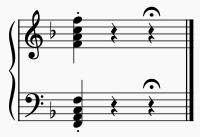
A **fermata**, or **pause** appears above/below a note, and extends its written duration, indicating a pause in the music.
It may also be written above a rest, or a barline, indicating the end of a piece or section of music.
### Breath mark
A **breath mark** is placed just above the staff, and tells a wind instrument performer or singer to take a breath here, or other instruments to pause slightly. It may occur between two notes or at the end of a measure.
### Caesura
The **caesura** also indicates a pause, slightly longer than a breath mark but less so than a fermata. It may occur between two notes or at the end of a measure.
## Adding a pause to your score
To add a fermata:
1. Select a note, rest or barline
2. Click on a fermata symbol in the **Breaths & pauses** palette.
Alternatively drag a fermata symbol onto a note.
Note that while it is customary for fermatas to be shown on all staves in a score, MuseScore Studio does not currently do this automatically: you must add fermatas to each stave manually.
To add a breath mark or caesura:
1. Seleziona una nota
2. Click on a breath mark/pause symbol in the **Breaths & pauses** palette.
Alternatively drag a breath mark/caesura symbol onto a note.
MuseScore automatically places the breath mark/caesura in the correct position, just above the staff and after the selected note. It may create extra horizontal space for the marking.
## Changing pause playback
Pause symbols have a playback effect in the score. To adjust the pause length:
1. Select the pause
2. Go to the **Properties** panel
3. Click **Playback**
4. In the popup, adjust the **Time stretch** value.
The **Time stretch** value scales the rhythmic duration of the note or rest to which the pause is attached.
## Pause properties
To specify whether a fermata is placed above or below the stave:
1. Seleziona la fermata
2. Go to the **Properties** panel
3. Under Fermata, choose the desired **Position** setting.
## Pause style
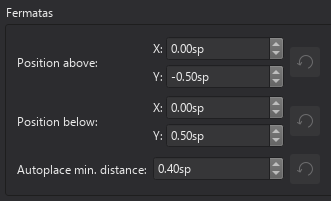
You can specify default positional properties for all fermatas in **Format -> Style -> Fermatas**.
---
# Agent Instructions
This documentation is published with GitBook. GitBook is the documentation platform designed so that both humans and AI agents can read, navigate, and reason over technical content effectively. Learn more at gitbook.com.
## Querying This Documentation
If you need additional information that is not directly available in this page, you can query the documentation dynamically by asking a question.
Perform an HTTP GET request on the current page URL with the `ask` query parameter, and the optional `goal` query parameter:
```
GET https://handbook.musescore.org/it/notation/expressive-markings/breaths-and-pauses.md?ask=&goal=
```
`ask` is the immediate question: it should be specific, self-contained, and written in natural language.
`goal` is optional and describes the broader end goal you are ultimately trying to accomplish on behalf of the user. GitBook uses it to tailor the answer towards what is most useful for that goal.
The response will contain a direct answer to the question and relevant excerpts and sources from the documentation.
Use this mechanism when the answer is not explicitly present in the current page, you need clarification or additional context, or you want to retrieve related documentation sections.