> For the complete documentation index, see [llms.txt](https://handbook.musescore.org/llms.txt). Markdown versions of documentation pages are available by appending `.md` to page URLs; this page is available as [Markdown](https://handbook.musescore.org/it/alternative-notation/mensural-notation-and-mensurstrich.md).
# Mensural notation and Mensurstrich
## Adding a mensural time signature to your score
To apply mensural signs to a score you need to add a conventional [time signature](/it/notation/rhythm-meter-and-measures/time-signatures.md) first, then modify its display by substituting with the appropriate mensural symbol in the [Time signature properties](/it/notation/rhythm-meter-and-measures/time-signatures.md#time-signature-properties) dialog. Note that these signs are for show only; it is not possible to modify the duration ratio between different note values, and the actual underlying time signature remains unchanged.
## Using mensural note symbols
\[To be added]
* add from symbols palette, hide
## Working with non-metered music
Early music, such as renaissance choral music, may be written without barlines or a time signature. This can be achieved in MuseScore as follows:
1. Set up the instruments or voices of the score in the usual way (See [Setting up your score](/it/basics/setting-up-your-score.md));
2. Hide the time signature;
3. in `Format`→`Style`→`Score`, check the box titled "Display note values across measure boundaries";
4. Right-click on a measure in the top staff and select [Staff/Part properties](/it/notation/instruments-staves-and-systems/staff-part-properties.md);
5. Uncheck "Show barlines"; repeat this for each applicable staff (see note);
6. Click `OK`.
**Note**: In step 4 you can make the barlines invisible instead by selecting all and pressing `V`.
Note that the score still behaves as if measures are present. [Measure properties](/it/notation/rhythm-meter-and-measures/measure-properties.md) can be applied if required.
## Working with Mensurstrich
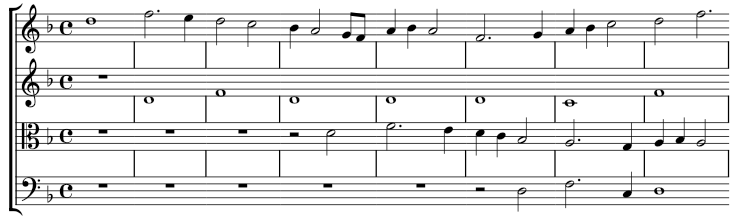
*Mensurstrich* is a form of modern notation of early music in which barlines are drawn *between* staves rather than across them:
### Adding barlines between staves
1. Right click on the bottom staff of the intended *mensurstrich* system, and select [Staff/Part properties](/it/notation/instruments-staves-and-systems/staff-part-properties.md#staff-properties). Uncheck "Show barlines".
2. Select the first (not the start!) barline for *each* of the remaining staves;
3. Check the "Span to next staff" box in the **Barline** section of the **Properties** panel;
4. Adjust "Span from" to set the position of the top of each barline;
5. Press `Set as staff default`;
## Displaying note values across measure boundaries
1. From the menu bar, select `Format`→`Style`→`Score`;
2. Check "Display note values across measure boundaries".
## See also
---
# Agent Instructions
This documentation is published with GitBook. GitBook is the documentation platform designed so that both humans and AI agents can read, navigate, and reason over technical content effectively. Learn more at gitbook.com.
## Querying This Documentation
If you need additional information that is not directly available in this page, you can query the documentation by asking a question.
Perform an HTTP GET request on the following URL with the `ask` and `goal` query parameters:
```
GET https://handbook.musescore.org/it/alternative-notation/mensural-notation-and-mensurstrich.md?ask=&goal=
```
`ask` is the immediate question: it should be specific, self-contained, and written in natural language.
`goal` is what the user is ultimately trying to achieve, the reason they need the answer. Sharing it helps GitBook give you a better, more relevant answer. A goal is most helpful when it describes the outcome the user wants rather than restating the question. For example, with `ask=how do I create an API token`, a goal like `automate deployments from our CI pipeline` lets GitBook tailor the answer to that use case.
The response will contain a direct answer to the question and relevant excerpts and sources from the documentation.
Use this mechanism when the answer is not explicitly present in the current page, you need clarification or additional context, or you want to retrieve related documentation sections.