# Saisir et modifier du texte

## Overview

Musescore has different text editing functionalities. This chapter and other chapters under handbook Text section focus on the [Musescore Text objects](#musescore-text-object), individual objects that can be placed on a score, and objects containing it. There are also [score settings](#score-settings) that add text onto pages automatically.

## Types of text

### MuseScore Text object

A MuseScore Text object is an object on a score that contains individual characters that can be entered and removed by using (typing on) a computer keyboard. It is usually attached to a note or a rest, some of them attach to another object.

* Staff Text can be attached to a staff;
* Jumps and Markers are attached to measures;
* Some types (**Title, Subtitle** etc.) must be attached to a frame, see [Frame](https://handbook.musescore.org/fr/formatting/using-frames-for-additional-content), and [Text blocks](https://handbook.musescore.org/fr/text/text-blocks) chapters.

Different types of Text object are not interchangeable. They have distinct property fields that affect how Musescore functions. For example, a **Staff Text** object styled as a metronome mark can never be configured to change playback tempo inside Musescore. The **Tempo** object should be used to change playback tempo inside Musescore.

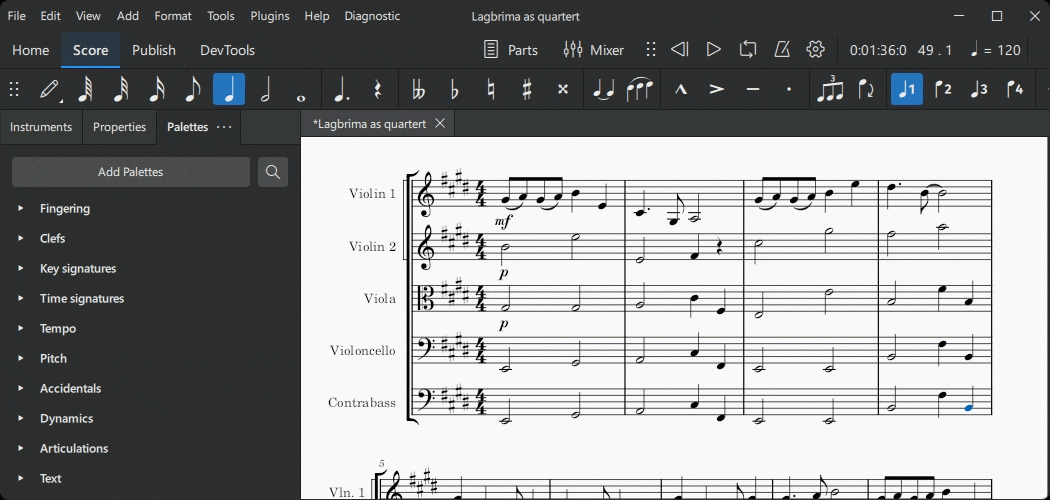
To check the object type, select an object on a score, its type is displayed on the status bar.\\

<figure><img src="https://2916339870-files.gitbook.io/~/files/v0/b/gitbook-x-prod.appspot.com/o/spaces%2FduxygJGBb4uQWhC9aJJP%2Fuploads%2Fgit-blob-3fb110322f3672e41669eb533f4353094e0cb95e%2Fms4checktype.png?alt=media" alt="Check text type using the status bar"><figcaption></figcaption></figure>

| Text object type                                                                                                        | Utilisations                                                                                                                                                                                                                                                                                                                                                                                                                                                                                                                                                                                                                                                                                                                                            |
| ----------------------------------------------------------------------------------------------------------------------- | ------------------------------------------------------------------------------------------------------------------------------------------------------------------------------------------------------------------------------------------------------------------------------------------------------------------------------------------------------------------------------------------------------------------------------------------------------------------------------------------------------------------------------------------------------------------------------------------------------------------------------------------------------------------------------------------------------------------------------------------------------- |
| Texte de portée                                                                                                         | General purpose text for one MuseScore instrument. Can be configured to apply swing playback or [sound flags](https://handbook.musescore.org/fr/sound-and-playback/sound-flags). See [Setting up your score](https://handbook.musescore.org/fr/basics/setting-up-your-score) and [Staff Text, System Text and Expression Text](https://handbook.musescore.org/fr/text/staff-system-and-expression-text) chapter.                                                                                                                                                                                                                                                                                                                                        |
| Texte de système                                                                                                        | Similar to Staff Text, but for all instruments in the system (page layout concept). See [Page layout concepts](https://handbook.musescore.org/fr/formatting/page-layout-concepts) and [Staff Text, System Text and Expression Text](https://handbook.musescore.org/fr/text/staff-system-and-expression-text) chapter.                                                                                                                                                                                                                                                                                                                                                                                                                                   |
| Texte d'expression                                                                                                      | The *expression* item in the **Text** [Palette](https://handbook.musescore.org/fr/basics/using-the-palettes). A new type introduced in Musescore 4. Does not affect Musescore playback as of Musescore 4.2. See [Staff Text, System Text and Expression Text](https://handbook.musescore.org/fr/text/staff-system-and-expression-text) chapter.                                                                                                                                                                                                                                                                                                                                                                                                         |
| Changement d'instrument                                                                                                 | The **Change instr.** item in the **Text** [Palette](https://handbook.musescore.org/fr/basics/using-the-palettes). Change the Musescore Instrument after the anchored note or rest. See [Setting up your score](https://handbook.musescore.org/fr/basics/setting-up-your-score) and [Mid-score instrument changes](https://handbook.musescore.org/fr/notation/instruments-staves-and-systems/mid-score-instrument-changes) chapters.                                                                                                                                                                                                                                                                                                                    |
| Nuance                                                                                                                  | Such as ***p*** and ***mf***, are Text that affects Musescore playback dynamics. See [Dynamics](https://handbook.musescore.org/fr/notation/expressive-markings/dynamics-and-hairpins) chapter.                                                                                                                                                                                                                                                                                                                                                                                                                                                                                                                                                          |
| Crescendo / Decrescendo                                                                                                 | Such as *crese.* and *dim.*, are Text line that affects Musescore playback dynamics. See [Hairpins](https://github.com/shoogle/Handbook/blob/fr/docs/text/broken-reference/README.md) chapter.                                                                                                                                                                                                                                                                                                                                                                                                                                                                                                                                                          |
| Annotation de technique de jeu                                                                                          | The legato. pizz. etc items in the **Text** [Palette](https://handbook.musescore.org/fr/basics/using-the-palettes). **\[This info is a work in progress, the software function is under active dev, pls see and update** [**Staff Text, System Text and Expression Text**](https://handbook.musescore.org/fr/text/staff-system-and-expression-text)**, and** [**Dynamics**](https://handbook.musescore.org/fr/notation/expressive-markings/dynamics-and-hairpins)**, and** [**Mixer**](https://handbook.musescore.org/fr/sound-and-playback/mixer)**, and** [**Glossary**](https://handbook.musescore.org/fr/appendix/glossary) **and** [**Articulations**](https://handbook.musescore.org/fr/notation/expressive-markings/articulations) **chapters]** |
| Tempo                                                                                                                   | Numerical metronome mark, verbal direction. A Text type that specifies Musescore playback tempo. See [Tempo marks](https://handbook.musescore.org/fr/text/tempo-markings) chapter.                                                                                                                                                                                                                                                                                                                                                                                                                                                                                                                                                                      |
| Gradual Tempo Change                                                                                                    | Such as **accel.**. A new Text line type introduced in Musescore 4 that affects Musescore playback tempo. See [Tempo marks](https://handbook.musescore.org/fr/text/tempo-markings) chapter.                                                                                                                                                                                                                                                                                                                                                                                                                                                                                                                                                             |
| **Swing** and **Straight** item in the **Tempo** [Palette](https://handbook.musescore.org/fr/basics/using-the-palettes) | A pre-configured System Text. See [Swing playback](https://handbook.musescore.org/fr/sound-and-playback/swing-playback) and [Staff Text, System Text and Expression Text](https://handbook.musescore.org/fr/text/staff-system-and-expression-text) chapters.                                                                                                                                                                                                                                                                                                                                                                                                                                                                                            |
| Paroles                                                                                                                 | Ctrl+V keyboard shortcut breaks up words stored in clipboard, paste and then jump to next anchor conveniently. See [Lyrics](https://handbook.musescore.org/fr/text/lyrics) chapter.                                                                                                                                                                                                                                                                                                                                                                                                                                                                                                                                                                     |
| Saut                                                                                                                    | Such as "D.C."(Da Capo), "D.S. al Coda" etc found in the **Repeats & Jumps** [Palette](https://handbook.musescore.org/fr/basics/using-the-palettes). See [Jumps and markers](https://handbook.musescore.org/fr/notation/repeats/jumps-and-markers) chapter.                                                                                                                                                                                                                                                                                                                                                                                                                                                                                             |
| Signe de reprise                                                                                                        | The Capo symbol, Segno symbol, "Fine", "To Coda" etc found in the **Repeats & Jumps** [Palette](https://handbook.musescore.org/fr/basics/using-the-palettes). See [Jumps and markers](https://handbook.musescore.org/fr/notation/repeats/jumps-and-markers) chapter.                                                                                                                                                                                                                                                                                                                                                                                                                                                                                    |
| Repère                                                                                                                  | The boxed **B1** item in the **Text** [Palette](https://handbook.musescore.org/fr/basics/using-the-palettes). Facilitate rehearsals, divide score into sections, bookmark passages etc. See [Rehearsal marks](https://handbook.musescore.org/fr/text/rehearsal-marks) chapter.                                                                                                                                                                                                                                                                                                                                                                                                                                                                          |
| Symbole d'accord                                                                                                        | Has playback, notes automatically decided. See [Chord symbol](https://handbook.musescore.org/fr/text/chord-symbols) chapter.                                                                                                                                                                                                                                                                                                                                                                                                                                                                                                                                                                                                                            |
| Numéro Nashville                                                                                                        | Has playback, similar to Chord symbol. See [Chord symbol:NNS](https://handbook.musescore.org/fr/chord-symbols#entering-a-nashville-number) chapter.                                                                                                                                                                                                                                                                                                                                                                                                                                                                                                                                                                                                     |
| Roman Numeral                                                                                                           | No playback. See [Chord symbol:RNA](https://handbook.musescore.org/fr/chord-symbols#rna) chapter.                                                                                                                                                                                                                                                                                                                                                                                                                                                                                                                                                                                                                                                       |
| Basse chiffrée                                                                                                          | A period keyboard notation. No playback. See [Figured bass](https://handbook.musescore.org/fr/text/figured-bass) chapter.                                                                                                                                                                                                                                                                                                                                                                                                                                                                                                                                                                                                                               |
| Doigtés de batterie                                                                                                     | Letters (L and R) attached to (drum) notes showing which hand or foot to use. See [Sticking](https://handbook.musescore.org/fr/idiomatic-notation/percussion/other-percussion-notation#sticking) chapter.                                                                                                                                                                                                                                                                                                                                                                                                                                                                                                                                               |
| Doigtés                                                                                                                 | Numbers or letters attached to notes showing which fingers to use. See [Fingering](https://handbook.musescore.org/fr/text/fingering) chapter.                                                                                                                                                                                                                                                                                                                                                                                                                                                                                                                                                                                                           |
| Title, Subtitle, Composer, Lyricist, and Text (text block type)                                                         | They are Text types designed to be added into a frame. See [Text blocks](https://handbook.musescore.org/fr/text/text-blocks) and [Frame](https://handbook.musescore.org/fr/formatting/using-frames-for-additional-content) chapters. They are *not* the placeholder text used in the header and footer, see ["Score setting"](#score-settings) section.                                                                                                                                                                                                                                                                                                                                                                                                 |
| Text line, including Volta, Pedal etc types                                                                             | Volta etc found in **Repeats & Jumps** [Palette](https://handbook.musescore.org/fr/basics/using-the-palettes). Pedal found in **Keyboard** Palette. Ottava (8--, 8ve, 8va, 15--) etc found in **Pitch** Palette. Guitar Barre lines etc. See [Other lines](https://handbook.musescore.org/fr/notation/expressive-markings/other-lines) chapter.                                                                                                                                                                                                                                                                                                                                                                                                         |

### Score settings

Long and short name of Musescore Instrument (see [Setting up your score](https://handbook.musescore.org/fr/basics/setting-up-your-score) chapter) is automatically added to the left of staff in each system (page layout concept, see [Page layout concepts](https://handbook.musescore.org/fr/formatting/page-layout-concepts) chapter). Names can be changed direcly on a score using **text edit mode**, or using **Staff/Part property** window, see [Staff/Part properties](https://handbook.musescore.org/fr/notation/instruments-staves-and-systems/staff-part-properties) chapter. They are, by default, only added when there are more than one instrument. To change this default behavior, change the setting under **Format → Style → Score**.

Measure numbers can be added automatically. Configure it at **Format → Style → Measure nubmers**, see [Measure numbering](https://handbook.musescore.org/fr/notation/rhythm-meter-and-measures/measure-numbering) chapter.

Musescore's header and footer functionality adds text to *every* pages *automatically*. Configure it at **Format → Style → Header & footer**. Placeholder text (special symbols) can be used to add information like the current page number, copyright claim etc. Placeholder text is also used to add metadata tags, the digital data of a score file, onto the score dynamically. See [Header and footer](https://handbook.musescore.org/fr/text/header-and-footer) chapter.

## Adding text object to a score

Different types of Text object are not interchangeable, *decide on the suitable object type before adding it.* Use the chart under ["Musescore Text object"](#musescore-text-object) section. For general engraving or visual display purpose, it is recommended to use a [Staff text](https://handbook.musescore.org/fr/text/staff-system-and-expression-text) or [System text](https://handbook.musescore.org/fr/text/staff-system-and-expression-text).

The following explains how to add text to a note or a rest or a valid anchor outside frames. Adding text to a [frame](https://handbook.musescore.org/fr/formatting/using-frames-for-additional-content) is covered in the [Text blocks](https://handbook.musescore.org/fr/text/text-blocks) chapter.

### From a palette

To add a text element to your score from a [Palette](https://handbook.musescore.org/fr/customization/palettes), either select one or more notes/rests and click on the desired palette item; or drag the text from the palette onto a note/rest. e.g.

<figure><img src="https://2916339870-files.gitbook.io/~/files/v0/b/gitbook-x-prod.appspot.com/o/spaces%2FduxygJGBb4uQWhC9aJJP%2Fuploads%2Fgit-blob-887764e744838f151c21fba5ed0189edb042dd1c%2FText-add-tempo-from-palette.gif?alt=media" alt="Add tempo indication"><figcaption></figcaption></figure>

### From the menu

If the text object is associated with a staff you can add it by selecting a note, then choosing a text option from **Add→Text**.

### Using a keyboard shortcut

Many text types can be entered using keyboard shortcuts. Shortcuts are shown to the right of items in **Add→Text**.

To create a text object, select a note, then enter the required shortcut.

## Deleting text object on a score

*To edit \*text automatically added by score settings\*, see* [*"Score setting"*](#score-settings) *section.*

To delete *object(s) on a score*, [select](https://handbook.musescore.org/fr/basics/selecting-elements) the objects then press `Backspace` or `Del`.

## Editing text object content

*To edit \*text automatically added by score settings\*, see* [*"Score setting"*](#score-settings) *section.*

Text and text line objects are edited with two different methods, depending on the object type:

* edit directly in **text edit mode**, as explained below; or
* edit properties in the [Properties panel](https://handbook.musescore.org/fr/basics/properties-panel), see the text object's specific chapter.

To enter **text edit mode** use one of the following methods:

* Double click on the text object, or
* Select the text object and press `Return`, or
* Select the text object and press `F2` or `Alt`+`Shift`+`E`, or
* Right-click on the text object and select "Edit element."

To leave **text edit mode** either press `Esc` or click on a part of the score outside the edit area.

### Keyboard shortcuts available inside text edit mode

The following keyboard shortcuts are available in **text edit mode**:

| Fonction                                    | Windows / Linux                                        | Mac                                    |
| ------------------------------------------- | ------------------------------------------------------ | -------------------------------------- |
| **Bold** (toggle)                           | `Ctrl`+`B`                                             | `Cmd`+`B`                              |
| *Italic* (toggle)                           | `Ctrl`+`I`                                             | `Cmd`+`I`                              |
| Underline (toggle)                          | `Ctrl`+`U`                                             | `Cmd`+`U`                              |
| Move cursor                                 | (`Ctrl`+) `Left`, `Right`, `Up`, `Down`, `Home`, `End` | (`Alt`+) `Left`, `Right`, `Up`, `Down` |
| Remove character to the left of the cursor  | `Backspace`                                            | `Backspace`                            |
| Remove character to the right of the cursor | `Suppr`                                                | `Del` or `Fn`+`Backspace`              |
| Start new line                              | `Entrée`                                               | `Entrée`                               |
| Insert special characters (see below)       | `Maj`+`F2`                                             | `Maj`+`F2`                             |

### Special characters

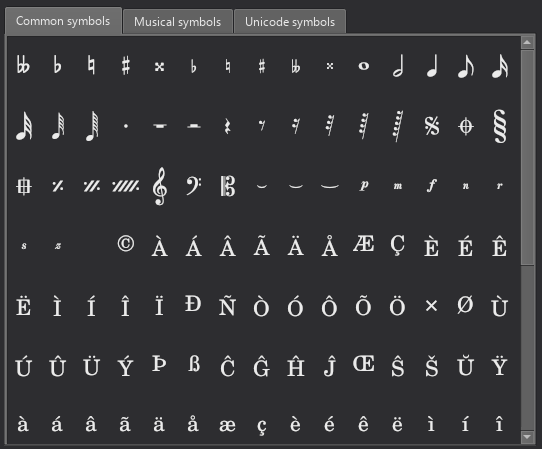
Characters not available from the standard keyboard may be accessed using the **Special Characters** window.

<figure><img src="https://2916339870-files.gitbook.io/~/files/v0/b/gitbook-x-prod.appspot.com/o/spaces%2FduxygJGBb4uQWhC9aJJP%2Fuploads%2Fgit-blob-d2241f91e6eb0624ce9648101157df6e227b4679%2Fspecial_chars.png?alt=media" alt="Special characters window"><figcaption></figcaption></figure>

To open **Special Characters**, in **text edit mode** (see ["Editing text object content"](#editing-text-object-content) section), press `Shift`+`F2`; or click on `Insert special characters` in the **Text** section of the [Properties](https://handbook.musescore.org/fr/basics/properties-panel) panel.

The dialog is divided into 3 tabs: **Common symbols, musical symbols and unicode symbols**. The musical and unicode tabs are further subdivided into alphabetically-arranged categories. It is preferable to use items in **Common symbols** tab as they are functional, see Musescore 3 handbook [Fonts](https://musescore.org/en/handbook/3/fonts) chapter.

Clicking an item in the Special Characters dialog immediately adds it to the text where the cursor is positioned. Multiple items can be applied without closing the dialog box, and the user can even continue to type normally, delete characters, enter numerical character codes etc., with it open.

In **text edit mode**, the following keyboard shortcuts add a *functional* version of special characters (whenever possible) into the current Text object, see Musescore 3 handbook [Fonts](https://musescore.org/en/handbook/3/fonts) chapter.

| Caractère                    | Windows / Linux  | Mac             | Note                                  |
| ---------------------------- | ---------------- | --------------- | ------------------------------------- |
| **Sharp ♯**                  | `Ctrl`+`Maj`+`#` | `Cmd`+`Maj`+`#` | May not work on some keyboard layouts |
| **Flat ♭**                   | `Ctrl`+`Maj`+`B` | `Cmd`+`Maj`+`B` |                                       |
| **Natural ♮**                | `Ctrl`+`Maj`+`H` | `Cmd`+`Maj`+`H` |                                       |
| **Piano&#x20;*****p***       | `Ctrl`+`Maj`+`P` | `Cmd`+`Maj`+`P` |                                       |
| **Forte&#x20;*****f***       | `Ctrl`+`Maj`+`F` | `Cmd`+`Maj`+`F` |                                       |
| **Mezzo&#x20;*****m***       | `Ctrl`+`Maj`+`M` | `Cmd`+`Maj`+`M` |                                       |
| **Rinforzando&#x20;*****r*** | `Ctrl`+`Maj`+`R` | `Cmd`+`Maj`+`R` |                                       |
| **Sforzando&#x20;*****s***   | `Ctrl`+`Maj`+`S` | `Cmd`+`Maj`+`S` |                                       |
| **Niente&#x20;*****n***      | `Ctrl`+`Maj`+`N` | `Cmd`+`Maj`+`N` |                                       |
| **Z&#x20;*****z***           | `Ctrl`+`Maj`+`Z` | `Cmd`+`Maj`+`Z` |                                       |
| **Elision&#x20;*****‿***     | `Ctrl`+`Alt`+`-` | `Cmd`+`Alt`+`-` |                                       |