> For the complete documentation index, see [llms.txt](https://handbook.musescore.org/llms.txt). Markdown versions of documentation pages are available by appending `.md` to page URLs; this page is available as [Markdown](https://handbook.musescore.org/fr/notation/pitch/noteheads.md).
# Têtes de notes
## Overview
This chapter discusses the appearance of noteheads in MuseScore.
### Notehead schemes
One aspect of music notation systems is **notehead scheme**. A scheme is a set of rules used to decide notehead shape's *meaning*, some of which are supported in MuseScore. Supported schemes relate notehead meaning to a note's:
* **duration**: as in the most widely used scheme.
* **pitch (using movable-do or absolute pitch solfege)**: literally written on it, and
* **pitch (relative pitch using shape note solfege)**: as in "shape note notation" (see reference under [External links](##external-links)).
The most widely used scheme is very likely the only one known to most musicians. It is referred to as "Normal" in MuseScore and is the default setting for a new staff. Details of the nine schemes available in MuseScore are covered in [Custom staff types:Notehead scheme](/fr/alternative-notation/custom-staff-types.md).
Connaître la notation relative des hauteurs (solfège et notation des formes de notes) peut faciliter la compréhension du présent chapitre. Le plus souvent, la forme de tête de note a une signification spécifique et réciproquement. Le solfège associé est comme une variante du solfège à do mobile qui se rapporte aux exceptions. Par exemple, si dans un type de note, un triangle doit être utilisé pour noter un do4, mais les triangles sont aussi lus comme des do ou des fa relatifs et doivent donc être chantées « fa » ou la syllabe d'usage local correspondante. Le solfège des formes de notes indique la perception d'intervalles beaucoup mieux que la notation classique.
### Notehead shape
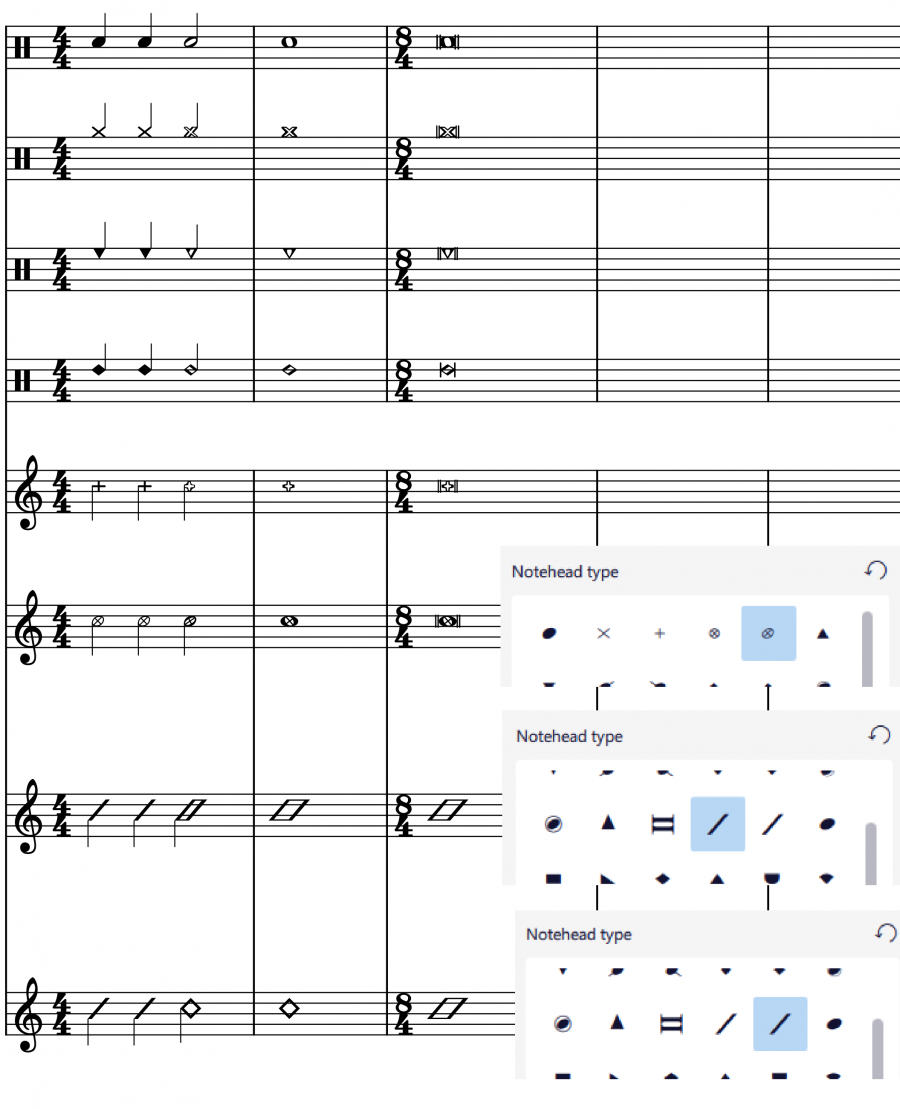
\ \_Shown above, the diamond notehead can be used for harmonic notes in guitar, violin etc; and slash notehead for guitar strums etc. The cross is also known as crosshead, ghost note, or dead note.\_
Final display of notehead shape in MuseScore is determined by three factors: the **notehead type factor**, the **pitch factor**, and the **duration factor** (or note-value, rhythm).
#### Pitch factor
Note pitch *may* affect affect notehead shape, depending on the scheme, but it only happens on note(s) that do not use an overriding **Notehead type** property. See ["Notehead type factor" section](#notehead-type-factor). "Normal" notehead scheme does not use pitch to determine notehead shape.
#### Duration factor
The duration factor is determined by a note's duration. To edit duration see [Entering notes and rests](/fr/basics/entering-notes-and-rests.md) and [Editing notes and rests](/fr/basics/editing-notes-and-rests.md) chapters. It also can be [visually overridden](#changing-notehead-shape) for an individual note, while keeping the real value and playback intact.
#### Notehead type factor
Options available for **notehead type factor** depends on [staff type](/fr/notation/instruments-staves-and-systems/staff-part-properties.md#overview):
* On Standard staffs (type 1a, type 1b), there are three levels:
1. Level 1 **Notehead scheme** of a **staff** : Default is "Normal".
2. Level 2 **Notehead scheme** of **a note** (option named "Notehead System" in Musescore 4.1.1):
* The default option "Auto" means "ignore this level".
* Other options: scheme to use on this note, overrides Level 1.
3. Level 3 **Notehead type** property of **a note**. Affects notehead shape **if and only if** the result scheme of Level 1 and Level 2 is "Normal".
* [Tablatures](/fr/idiomatic-notation/guitar/entering-and-editing-tablature-notation.md) (type 2) do not use notes. To change selected fret number(s) into crosshead, click the cross item in the **Noteheads** [palettes](/fr/basics/using-the-palettes.md). To enclose selected fret number(s) with brackets (parentheses, dead note or ghost note), use `Shift`+`X`. Only the first two items of **Noteheads** [palettes](/fr/basics/using-the-palettes.md) works on Tablatures.
* On percussion staffs (type 3), instrument (like snare or hi-hat, not the "drumset" MuseScore Instrument) determines the notehead type factor. See [Entering and editing percussion notation: Notehead shape](https://musescore.org/en/handbook/3/entering-and-editing-percussion-notation#notehead) chapter.
**Notehead scheme** is used to determine notehead shape unless overridden by individual note's **Notehead type** property. When notehead scheme is not overridden, note pitch *may* affect notehead shape, depending on the scheme. "Normal" notehead scheme does not use pitch to determine notehead shape. When a note uses an overriding Notehead type property, note pitch information does not affect notehead shape at all.
## Changing notehead shape
**Notehead type factor**
* (Valid on standard staffs only) To change level 1 **notehead scheme** of a **single staff**, affecting all notes:
1. Right click on an **empty** part of the desired staff and select **Staff/Part properties**.
2. Click on the **Advanced style properties** button (opens **Edit Staff Type** window).
3. Select an option in **Notehead scheme** dropdown.
* (Valid on standard staffs only) To change level 2 **notehead scheme** of **note(s)**:
1. Select note(s) on a score.
2. In the **Properties** panel, open **Note: Head tab**.
3. select an option from the **Notehead system** dropdown (you may need to click "Show more" at the bottom of the panel to reveal it): the default "Auto" means "ignore this level".
* (Valid on standard staffs only) To change level 3 **notehead type** property:
1. Select note(s) on a score.
2. Utilisez l'une des méthodes suivantes :
* In **Properties** panel, open **Note: Head tab**, select a **Notehead type**, or
* Click on an item in the **Noteheads** [palettes](/fr/basics/using-the-palettes.md), or drag it onto a notehead in the score.
* To change selected fret number(s) into crosshead, click the cross item in the **Noteheads** [palettes](/fr/basics/using-the-palettes.md). To enclose selected fret number(s) with brackets (parentheses, dead note or ghost note), use `Shift`+`X`.
* To change noteheads on percussion staffs, see [Entering and editing percussion notation: Notehead shape](https://musescore.org/en/handbook/3/entering-and-editing-percussion-notation#notehead) chapter.
**Duration factor**
* To change note duration, see [Entering notes and rests](/fr/basics/entering-notes-and-rests.md) and [Editing notes and rests](/fr/basics/editing-notes-and-rests.md).
* To change the apparent duration *without altering real value* so that playback is not affected:
1. Select note(s) on a score.
2. In the **Properties** panel, open **Note: Head tab**.
3. Select the desired option from the **Override visual duration** (you may need to click "Show more" at the bottom of the panel to reveal it): the default "Auto" means "no override"
## Adding pitch information to notes
\ \_shown above 7 Shape (Aikin), a "shape note notation"\_
There are six methods to change "pitch".
Most of the time, a note's pitch only affects its staff space / vertical position, to change it:
* Change note pitch, see [Entering notes and rests](/fr/basics/entering-notes-and-rests.md) and [Editing notes and rests](/fr/basics/editing-notes-and-rests.md).
* Modify the **playback** pitch of **note(s)** on score *without altering notation*: In **Properties** panel, click **General: Playback** , edit **Tuning (cents)**. This is useful for reasons explained in Musescore 3 Handbook's [Tuning systems, microtonal notation system, and playback](https://musescore.org/en/handbook/3/tuning-systems-microtonal-notation-system-and-playback). Does not work on instruments using Muse sounds (yet) on Musescore 4.1.1
[Tablatures](/fr/idiomatic-notation/guitar/entering-and-editing-tablature-notation.md), [percussion staffs](https://musescore.org/en/handbook/3/entering-and-editing-percussion-notation#notehead) and some notehead scheme (see [Overview](#overview)) use notehead shape to convey pitch information:
* *\[not working yet, upcoming fixed 4.3* [*https://github.com/musescore/MuseScore/issues/16500*](https://github.com/musescore/MuseScore/issues/16500) *]* The brackets (parentheses, dead note or ghost note) item in **Noteheads** [palettes](/fr/basics/using-the-palettes.md) can be added to a note or accidental.
* To change selected fret number(s) into crosshead, click the cross item in the **Noteheads** [palettes](/fr/basics/using-the-palettes.md). To enclose selected fret number(s) with brackets (parentheses, dead note or ghost note), use `Shift`+`X`.
* To use custom notehead shape for **visual pitch representation**:
1. [Change level 1 setting](#changing-notehead-shape) as required *for the staff.*
2. Use a level 2 overriding setting on selected note(s):
1. Select note(s) on a score.
2. In the **Properties** panel, open **Note: Head tab**.
3. Select an "Normal" from the **Notehead system** dropdown (you may need to click "Show more" at the bottom of the panel to reveal it).
3. Assign level 3 **notehead type** property. Use either one of the following:
* In **Properties** panel, open **Note: Head tab**, select a **Notehead type**, or
* Click on an item in the **Noteheads** [palettes](/fr/basics/using-the-palettes.md), or drag it onto a notehead in the score.
4. These note(s) will be **always** use this item, regardless of [any future pitch change by user](/fr/basics/editing-notes-and-rests.md) unlike other notes on this staff.
5. [Change **duration factor**](#changing-notehead-shape) as required.
* To loosen the relationship between note vertical position and pitch so that **all notes on a staff** create desired playback, take advantage of ['Transposing instruments' feature](/fr/notation/pitch/transposition.md#working-with-transposing-instruments).
## Changing notehead direction
To move notehead(s) *horizontally* to the other side of stem, use one of the following:
* Press `Shift`+`X`, or
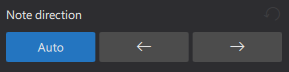
* In **Properties** panel, open **Note: Head tab**, select a **Notehead direction** (you may need to click "Show more" at the bottom of the panel to reveal it).\\
(**Note**: Contrast this command with `X` which moves the stem and beam *horizontally and vertically* to other side of the notehead)
## Notehead properties
Selecting a note(s) on score, in the **Properties** panel **Note: Head tab** :
* **Notehead parentheses**: Add or remove parentheses.
* **Notehead type**: See [overview](#overview) and [changing notehead shape](#changing-notehead-shape).
* **Hide notehead**: Makes notehead invisible, see [Properties: visibility](/fr/basics/properties-panel.md#visibility).
* **Small notehead**
* **Duration dot position**: This provides an alternative vertical offset for the duration dot.
* Show more / Show less button
* **Notehead system**: level 2 **Notehead scheme**, see [Overview](#overview). The default "Auto" means "ignore this level".
* **Override visual duration**: change **duration factor**, see [Overview](#overview). "Auto" means "no override".
* **Note direction**: See [Changing notehead direction](#changing-notehead-direction) (above).
* **Notehead offset**: This changes the offset of the notehead *only* (to change the offset of the complete note, use "Offset" in **Properties: Appearance** instead).
## Notehead style and font
There are 8 font options (two new options compared to MuseScore 3) for notehead set in Format→Style→Score. Notehead does not use style profiles ([Templates and styles](/fr/customization/templates-and-styles.md)).\
Noteheads [palette](/fr/basics/using-the-palettes.md) is displayed with Bravura font.
## Sharing noteheads between voices
When two notes in different voices coincide on the same beat, they can either share a *single* notehead, or else be offset to allow the display of *both* noteheads. This is done *automatically* by MuseScore according to certain rules (see below).
To force two offset noteheads in different voices to share a single notehead, use one of the following methods:
* Make the smaller-value notehead [invisible](/fr/basics/properties-panel.md#visibility). This works for the majority of cases.
* Select the smaller value notehead and in the **Note** section of the **Properties** toolbar change "Head type (visual only)" to that of the higher value note.
**Rules for automatically sharing or offsetting noteheads**:
* Notes with stems in the same direction do not share noteheads.
* Dotted notes do not share noteheads with undotted notes.
* Black notes do not share noteheads with white notes.
* Whole notes never share noteheads.
### Remove duplicate fretmarks in tablature
If you are using **paired standard and tablature staves** you will come across situations where a shared notehead in the standard staff generates two fretmarks in tablature. In this case simply hide one of the fretmarks by making it [invisible](/fr/basics/properties-panel.md#visibility).
## See also
* [Entering and editing percussion notation](/fr/idiomatic-notation/percussion/inputting-percussion-notation.md)
## External links
* [The Music Notation Project Wiki > Shape Note Notation](https://musicnotation.org/wiki/notation-systems/shape-note-notation/)
* [IMSLP.org Wiki > 4-shape notation](https://imslp.org/wiki/Category:4-shape_notation)
* [IMSLP.org Wiki > 7-shape notation](https://imslp.org/wiki/Category:7-shape_notation)
---
# Agent Instructions
This documentation is published with GitBook. GitBook is the documentation platform designed so that both humans and AI agents can read, navigate, and reason over technical content effectively. Learn more at gitbook.com.
## Querying This Documentation
If you need additional information that is not directly available in this page, you can query the documentation by asking a question.
Perform an HTTP GET request on the following URL with the `ask` and `goal` query parameters:
```
GET https://handbook.musescore.org/fr/notation/pitch/noteheads.md?ask=&goal=
```
`ask` is the immediate question: it should be specific, self-contained, and written in natural language.
`goal` is what the user is ultimately trying to achieve, the reason they need the answer. Sharing it helps GitBook give you a better, more relevant answer. A goal is most helpful when it describes the outcome the user wants rather than restating the question. For example, with `ask=how do I create an API token`, a goal like `automate deployments from our CI pipeline` lets GitBook tailor the answer to that use case.
The response will contain a direct answer to the question and relevant excerpts and sources from the documentation.
Use this mechanism when the answer is not explicitly present in the current page, you need clarification or additional context, or you want to retrieve related documentation sections.