> For the complete documentation index, see [llms.txt](https://handbook.musescore.org/llms.txt). Markdown versions of documentation pages are available by appending `.md` to page URLs; this page is available as [Markdown](https://handbook.musescore.org/fr/idiomatic-notation/keyboard/pedal.md).
# Pédale
For Harp Pedal see [Idiomatic notation: Harp](/fr/idiomatic-notation/harp.md) instead.
## Types of pedal markings
This chapter focuses on the types of piano pedal engraving available, for knowledge of various piano pedals see [wikipedia article](https://en.wikipedia.org/wiki/Piano_pedals).
### In terms of visual representation
Supported engravings including:
* Line at either or both ends, have no hook or hooks at angles of either 45 or 90 degrees, or "T" end;
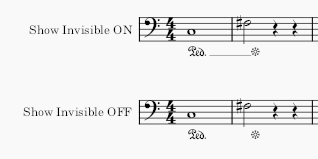
* **Ped.** followed by such a line, or a rosette symbol (\*): The line from the built-in **Ped. \*** palette item is invisible and non-printing. Adjust on-screen display with **View menu > Show > Show invisible** setting accordingly, see [The user interface](/fr/navigation/the-user-interface.md). To convert the line to visible in printing, or style it as dashed, see [properties](#pedal-properties).\\
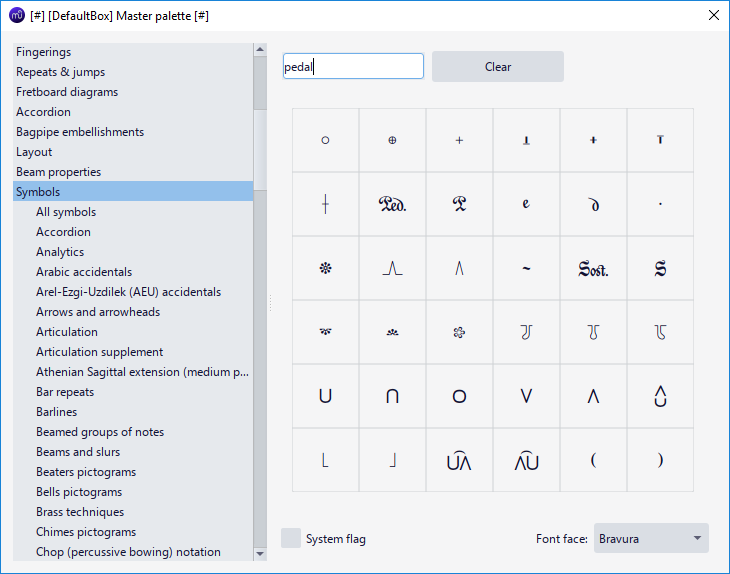
* Other related symbols and pictogram can be found under **Symbols** category in **Master palette** window, see [Other symbols](/fr/notation/expressive-markings/other-symbols.md). ***Sost.*** (sostenuto pedal) marking should not be confused with **sost.--** [Tempo markings](/fr/text/tempo-markings.md), see also [discussion on steinberg.net](https://forums.steinberg.net/t/sostenuto-inconsistent-preset-behaviour/131902).\\
* Create custom **sim.** or **pedal ad lib** marking with [Staff text](/fr/text/staff-system-and-expression-text.md).
* Full pedal is implied for playback, [embed images](/fr/formatting/working-with-images.md) to add pedal strength symbols for engraving need.
### In terms of function inside MuseScore
There are three different subtypes:
**Type 1** includes:\\
* Line with **45 degree** angled **End hook** or **no End hook**, with or without **Ped.** beginning text.
* **Ped.** followed by a rosette symbol (\*)
Visually, the line or symbol only extends horizontally to the *notehead* attached to the **end anchor**.\
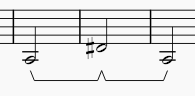
Functionally, if that note is attached to another marking's **start anchor**, the following marking will automatically connect and make a shape resembling "-^-", which is indicative of the piano technique *"pedal released and pressed again without releasing this note"*.\\
\ \_shown above is the auto connect, their playback are also in line with the piano technique\_\ If the instrument use \[SoundFonts]\(../../sound-and-playback/soundfonts.md) such as "MS Basic", or when exported as MIDI file, sustain (MIDI CC 64) is created. When consecutive type 1 markings create a "-^-", playback matches the piano technique, the \_first marking\_ is interpreted by synthesizer as \_released \*\*at\*\* the note attached to the \*\*end anchor\*\*\_. Single or trailing type 1 markings creates playback like type 2: \_sustain until the note attached to the \*\*end anchor\*\* ends.\_\\
\ \_The last two type 1 markings shown above are single or trailing, they create the same playback as type 2\_
**Type 2** includes:\\
* Line other than described in Type 1, with or without **Ped.** beginning text.
Visually, the line extends horizontally to an aprpopiate length spanning the *full duration* of note attached to the **end anchor**.\
Functionally, if the instrument use [SoundFonts](/fr/sound-and-playback/soundfonts.md) such as "MS Basic", or when exported as MIDI file, sustain (MIDI CC 64) is created. Type 2 always *sustain until the note attached to the **end anchor** ends.*
Type 1 and 2 are interchangable by adjusting [properties](#pedal-properties).
**Type 3** includes the sostenuto pedal marking and custom Staff texts, they are for engraving purpose only and are non-functional.
## Adding pedal markings to your score
\ \_shown above a type 2 marking on score\_
Add pedal markings from **Lines** palette, see [Other lines:Adding a line to your score](/fr/notation/expressive-markings/other-lines.md).
Adjust with `Shift`+`Left`/`Right`, switch handle with `Tab`, see [Adjusting elements directly: Changing the range of a line](/fr/basics/adjusting-elements-directly.md#changing-the-range-of-a-line).
Unfortunately, you might need to make compromise with engraving style or not notate at all if you must create a desired playback, because of the functional limitation of Type 1 and Type 2 explained. As of Musescore 4.1.1, pedal marking always create sustain playback only (**cannot** be turned off), making it impossible to use "add redundant symbol, make it invisible" trick.
To create shape resembling "-^-" with consecutive Type 1 markings, make sure the **end anchor** is attached correctly, which is usually to the **first note of the next measure** instead of the last note of the previous measure. This big picture shows the correct **end anchor** result.\\
MuseScore 4.1.1 does not offer keyboard shortcut bindings to palette items, the keyboard shortcut key available in Musescore 3 that you can use to re-apply the same (last used) palette item is removed (not reimplemented yet).
## Creating pedal changes
*Not to be confused with* [*Harp pedal change*](/fr/idiomatic-notation/harp.md)
Use type 1 markings, explained in ["adding marking" section](#adding-pedal-markings-to-your-score).\
For issues related to MusicXML direction import / export, there are upcoming changes in Musescore 4.2, see forum discussion **\[please feel free to update info here]**
## Pedal properties
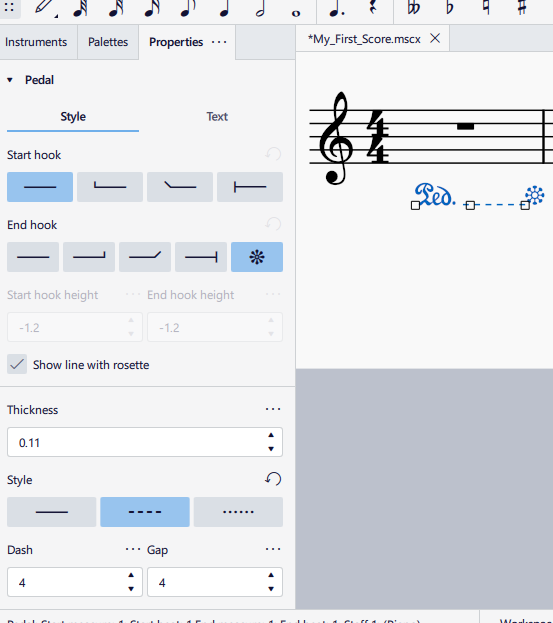
Select pedal marking(s), in [Properties panel](/fr/basics/properties-panel.md) Pedal section, [Line properties](/fr/notation/expressive-markings/other-lines.md#line-properties) can be set, the extra option available to pedal marking is **"Show line with rosette"** checkbox under **Style** tab, tick it to make [the default line visible in printing and exporting](#types-of-pedal-markings).
## Pedal style
See [Templates and styles](/fr/customization/templates-and-styles.md)
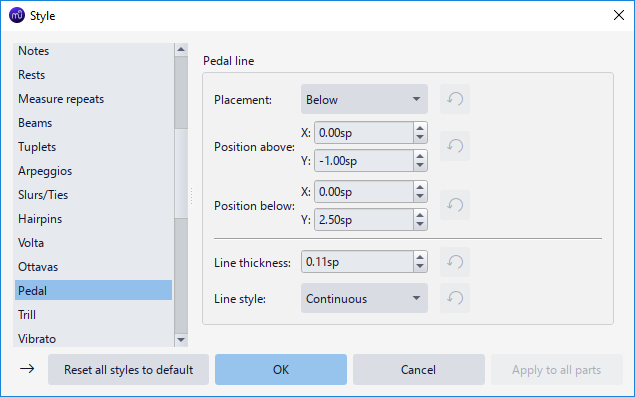
Values of the "Style for Pedal" can be edited in **Format→Style→Pedal**.\
Values of the "Style for text inside Pedal" can be edited in **Format→Style→Text styles→Pedal**\
See also [Line style](/fr/notation/expressive-markings/other-lines.md#line-style).
---
# Agent Instructions
This documentation is published with GitBook. GitBook is the documentation platform designed so that both humans and AI agents can read, navigate, and reason over technical content effectively. Learn more at gitbook.com.
## Querying This Documentation
If you need additional information that is not directly available in this page, you can query the documentation by asking a question.
Perform an HTTP GET request on the following URL with the `ask` and `goal` query parameters:
```
GET https://handbook.musescore.org/fr/idiomatic-notation/keyboard/pedal.md?ask=&goal=
```
`ask` is the immediate question: it should be specific, self-contained, and written in natural language.
`goal` is what the user is ultimately trying to achieve, the reason they need the answer. Sharing it helps GitBook give you a better, more relevant answer. A goal is most helpful when it describes the outcome the user wants rather than restating the question. For example, with `ask=how do I create an API token`, a goal like `automate deployments from our CI pipeline` lets GitBook tailor the answer to that use case.
The response will contain a direct answer to the question and relevant excerpts and sources from the documentation.
Use this mechanism when the answer is not explicitly present in the current page, you need clarification or additional context, or you want to retrieve related documentation sections.