> For the complete documentation index, see [llms.txt](https://handbook.musescore.org/llms.txt). Markdown versions of documentation pages are available by appending `.md` to page URLs; this page is available as [Markdown](https://handbook.musescore.org/fi/sound-and-playback/swing-playback.md).
# Swing-toisto
## Overview
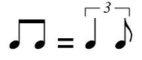
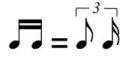
Music in “straight” time is performed strictly as written in the score. By contrast, music in **swing** time interpets straight eigth and sixteenth notes as triplet pairs, with the first of the pair being roughly twice as long as the second. This gives the rhythm a characteristic bouncy feel—often asssociated with Jazz music. e.g.
Swung eighths:
Swung sixteenths:
Rather than notate swung music exactly as performed, it is accepted convention to write it in straight time and simply provide the written indications “Swing and “Straight” at appropriate points in the score.
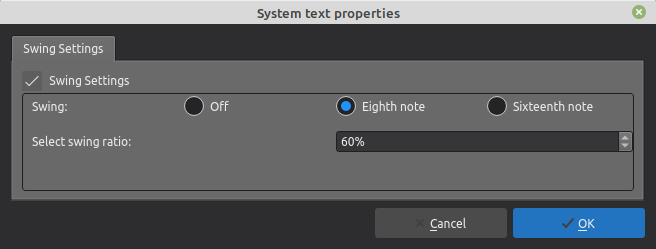
Swing markings have a playback effect on the score. The default swing ratio is 60% (3:2) but you can vary this to suit the feel of the piece if required.
## Adding a swing or straight marking to your score
### To add a swing marking
1. Klikkaa kohdenuottia tai taukoa
2. Klikkaa **Swing**-tekstiä **Tempo**-paletissa.
Vaihtoehtoisesti voit vetää ja pudottaa **Swing**-tekstin paletista haluamasi nuotin tai tauon päälle.
Voit halutessasi lisätä partituuriin myös [visuaalisen swing-merkinnän](https://musescore.org/en/node/266325).
### To add a straight marking
1. Klikkaa kohdenuottia tai taukoa
2. Klikkaa **Suora**-tekstiä **Tempo**-paletissa.
Note that the above markings are a form of [System text](/fi/text/staff-system-and-expression-text.md) and therefore the playback effect is applied to all staves in the system. If you want swing to apply to only one staff you can use [Staff text](/fi/text/staff-system-and-expression-text.md) instead: see below.
## Changing swing playback
### Adjust the type and degree of swing
1. Klikkaa hiiren oikealla partituurin **Swing**-tekstiä ja valitse **Viivastoryhmän tekstin ominaisuudet**.
2. Muokkaa **Swing-asetukset**-välilehdellä "Swing" ja "Swing-suhde" tarpeen mukaan.
**Huomaa**: Swing-asetukset löytyvät sekä viivastoryhmä- että viivastoteksteistä.
### Apply swing to one staff only
Jos haluat swing-toiston koskevan vain yhtä viivastoa, käytä viivastotekstiä viivastoryhmätekstin sijaan:
1. Valitse kohdenuotti tai tauko.
2. Klikkaa **Viivastoteksti**-merkintää **Teksti**-paletissa.
3. Muokkaa tekstiä haluamasi lopputuloksen luomiseksi
4. Klikkaa tekstiä hiiren oikealla ja valitse **Viivastotekstin ominaisuudet**. Vaihtoehtoisesti voit valita tekstiobjektin ja klikata **Ominaisuudet**-paneelissa **Viivastotekstin ominaisuudet** -painiketta.
5. Muokkaa **Swing-asetukset**-välilehdellä "Swing" ja "Swing-suhde" tarpeen mukaan.
---
# Agent Instructions
This documentation is published with GitBook. GitBook is the documentation platform designed so that both humans and AI agents can read, navigate, and reason over technical content effectively. Learn more at gitbook.com.
## Querying This Documentation
If you need additional information that is not directly available in this page, you can query the documentation by asking a question.
Perform an HTTP GET request on the following URL with the `ask` and `goal` query parameters:
```
GET https://handbook.musescore.org/fi/sound-and-playback/swing-playback.md?ask=&goal=
```
`ask` is the immediate question: it should be specific, self-contained, and written in natural language.
`goal` is what the user is ultimately trying to achieve, the reason they need the answer. Sharing it helps GitBook give you a better, more relevant answer. A goal is most helpful when it describes the outcome the user wants rather than restating the question. For example, with `ask=how do I create an API token`, a goal like `automate deployments from our CI pipeline` lets GitBook tailor the answer to that use case.
The response will contain a direct answer to the question and relevant excerpts and sources from the documentation.
Use this mechanism when the answer is not explicitly present in the current page, you need clarification or additional context, or you want to retrieve related documentation sections.