> For the complete documentation index, see [llms.txt](https://handbook.musescore.org/llms.txt). Markdown versions of documentation pages are available by appending `.md` to page URLs; this page is available as [Markdown](https://handbook.musescore.org/fi/notation/rhythm-meter-and-measures/barlines.md).
# Tahtiviivat
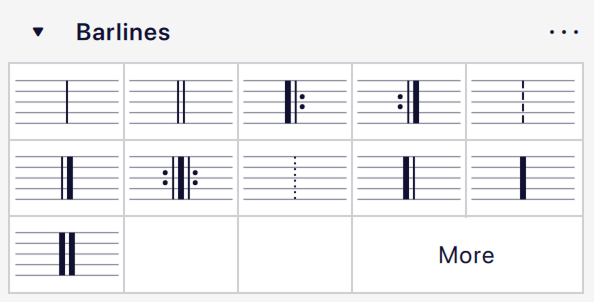
The **Barlines** [palette](/fi/basics/using-the-palettes.md) contains a full range of common barlines.
## Adding double and other special barlines
### Changing barline type for all staves
1. Select one or more barlines in a staff.
2. Klikkaa haluamaasi tahtiviivaa paletissa.
Vaihtoehtoisesti voit vetää tahtiviivan paletista partituurin tahtiviivan päälle.
Muutokset otetaan automaattisesti käyttöön kaikissa viivastoissa samassa partituurin kohdassa.
### Changing barline type for a single staff
1. Select one or more barlines in the score.
2. Pidä `Ctrl`-näppäin painettuna (Mac: `Cmd`) ja klikkaa haluamaasi tahtiviivaa paletissa.
Vaihtoehtoisesti voit pitää `Ctrl`-näppäimen (Mac: `Cmd`) painettuna ja vetää tahtiviivan paletista partituurin tahtiviivan päälle.
Only selected barlines are affected when using this modifier.
### Adding mid-measure barlines
1. Select a note or rest (or several, as a list selection).
2. Klikkaa paletissa olevaa tahtiviivaa.
This will add a barline marking after each selected note. The barline is for visual purposes and does not factor into any measure operations.
Jos haluat jakaa tahdin lisäämällä samalla *oikean* tahdin, katso [Tahdin jakaminen](/fi/notation/rhythm-meter-and-measures/pickup-and-non-metered-measures.md#splitting-a-measure).
## Changing barline length
Tässä käsittelemme tahtiviivojen pystysuuntaista jatkamista viivastojen yhdistämiseksi tai niiden lyhentämistä osittaisten tahtiviivojen luomiseksi.
### Extending all barlines in a staff
1. Select a barline on the 'starting' (topmost) staff.
2. Tee jokin seuraavista:
* Drag the end handle downwards until it meets the destination staff (this method is the best for extending barlines through multiple staves).
* Select the edit handle and press `Down`.
* Check the **Span to next staff** box in the **Barlines** section of the **Properties** panel, then click **Set as staff default**.
3. Toista tarvittaessa seuraaville viivastoille.
Tahtiviiva napsahtaa paikalleen, ja kaikki muut tahtiiviivat samassa viivastossa seuraavat perässä.
### Extending selected barlines in a staff
1. Valitse yksi tai useampi tahtiviiva (ja niiden vastineet alla olevissa viivastoissa, jos yhdistettäviä viivastoja on enemmän kuin kaksi).
2. Check **Span to next staff** in the **Barlines** section of the **Properties** panel.
### Creating partial barlines
Osittaisia tahtiviivoja voidaan luoda säätämällä **Ominaisuudet**-paneelin **Tahtiviiva**-osiossa olevia **Aloita viivastolta** ja **Ulota viivastoon** -asetuksia.
### Creating barlines between staves only (Mensurstrich)
Katso [Mensuuriviivojen käyttö](/fi/alternative-notation/mensural-notation-and-mensurstrich.md#working-with-mensurstrich).
## Barline properties
Voit muokata tahtiviivojen ominaisuuksia [Ominaisuudet](/fi/basics/properties-panel.md)-paneelin **Tahtiva**-osiossa:
* **Style**: The barline type (single, double, dashed, final, etc.).
* **Span to next staff**: If checked, the barline will be extended to reach the next staff down.
* **Span from**: The vertical position of the top of the barline.
* **Span to**: The vertical position of the bottom of the barline.
{% hint style="info" %}
\*\*Aloita viivastolta\*\* -asetus määrittää siirtymän viivaston ylimpään viivaan nähden. Kuten useimmissa muissakin pystysuuntaisissa sijoitteluasetuksissa MuseScore Studiossa, positiiviset arvot siirtävät alaspäin ja negatiiviset arvot ylöspäin.
**Ulota viivastoon** -asetuksen toiminta riippuu siitä, onko **Ulota seuraavaan viivastoon** valittuna. Jos ei ole valittuna, tämä arvo on siirtymä alimpaan viivastoviivaan nähden. Jos on valittuna, tahtiviiva jatkuu alaspäin ja ulottuu seuraavan viivaston oletustahtiviivan yläreunaan (eli joko ylimpään viivastoviivaan tai yksiviivaisessa viivastossa 2sp viivaston yläpuolelle). Tässä poikkeustapauksessa siirtymä toimii päinvastoin kuin tavallisesti: positiiviset arvot siirtävät *ylöspäin* ja negatiiviset arvot *alaspäin*.
One-line staves present one further complication: the default barline, which is drawn when both the **Span from** and **Span to** settings are 0, is drawn from 2sp above the line to 2sp below. The span offsets are however still relative to the (only) staff line and, if **Span to next staff** is unchecked, changing one will also apply the other (even if it is 0).
Lopuksi, näiden siirtymien yksikkönä on kaikissa tapauksissa *puoli* viivastoväliä (sp).
{% endhint %}
**Aseta viivaston oletukseksi** -painike ottaa käyttöön valitun tahtiviivan kaikki **Ulottuvuus**-asetukset koko viivaston tahtiviivoihin.
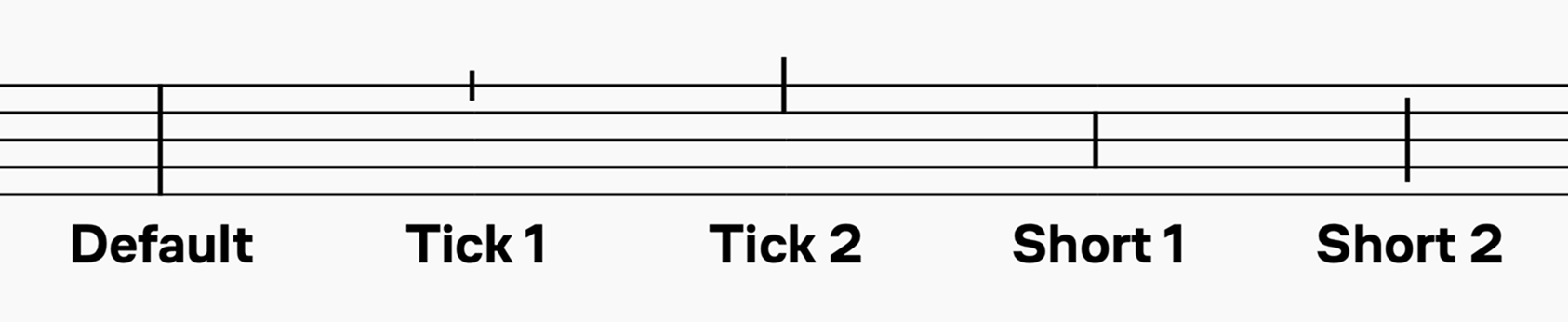
**Ulottuvuuden esiasetukset** -painikkeet ottavat käyttöön tiettyjä oletusarvoja tahtiviivalle:
Kun esiasetuksia käytetään, ne asettavat **Aloita viivastolta** ja **Ulota viivastoon** -arvoiksi tiettyjä arvoja ja **Oletus**-arvoa lukuun ottamatta poistavat **Ulota seuraavaan viivastoon** -valinnan käytöstä.
## Barline style
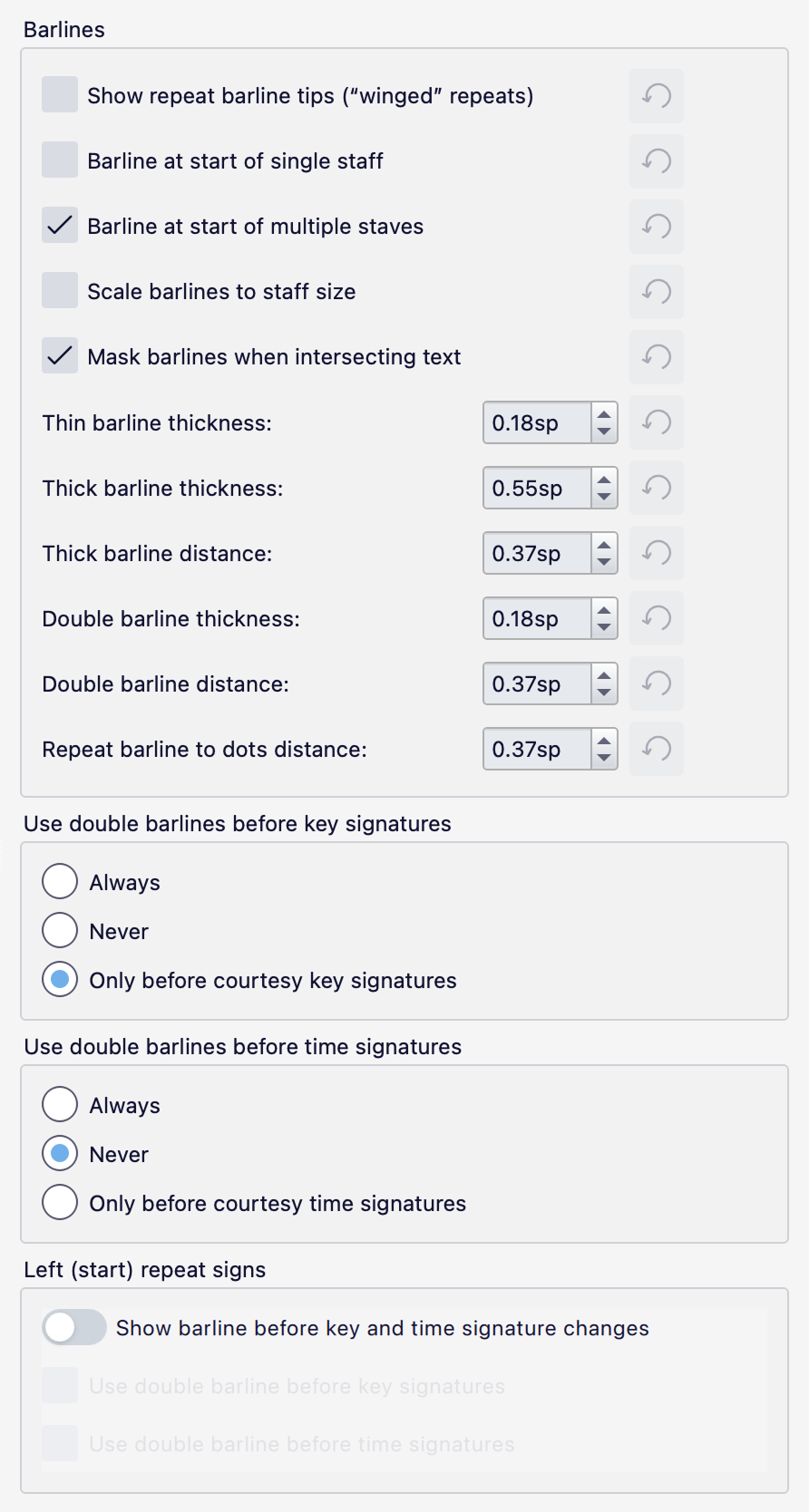
Kaikkien partituurin tahtiviivojen valittuja ominaisuuksia voidaan muuttaa kohdassa **Muotoilu → Tyyli → Tahtiviivat**:
* **Show repeat barline tips:** Adds 'wings' above and below repeat barlines.
* **Barline at start of single staff:** Whether a system containing only one staff should have an initial system barline.
* **Barline at start of multiple staves:** Whether a system containing more than one stave should have an initial system barline.
* **Scale barlines to staff size:** Whether the thickness of barlines should be scaled on resized staves.
* **Mask barlines when intersecting text:** Whether barlines should be masked when text crosses over them.
* **Thin barline thickness:** The thickness of a 'normal' thin barline.
* **Thick barline thickness:** The thickness of a thick barline (for example, the thick portion of a repeat barline or final barline).
* **Thick barline distance:** The distance between the thick and thin portions of a repeat or final barline.
* **Double barline thickness:** The thickness of the lines in a double barline.
* **Double barline distance:** The distance between the two lines in a double barline.
* **Repeat barline to dots distance:** The distance between the innermost line of a repeat barline and its dots.
* **Use double barlines before key signatures / time signatures:** Lets you choose if and when double barlines are automatically shown before key or time signatures.
* **Left (start) repeat signs** contains the following options:
* **Show barline before key and time signatures changes:** When turned on, adds an additional barline before key and time signatures that are before a left repeat sign. You can also choose if this is a double barline or not.
The thickness and distance settings are among those which may change automatically when changing a score's music font, if **Style -> Score -> Automatically load style settings based on font** is checked (which it is by default).
## See also
* [Fixed measure widths](https://musescore.org/en/node/313555#comment-1169175) for a workaround to ensure barlines are aligned vertically between systems.
* [Repeat signs](/fi/notation/repeats/repeat-signs.md)
---
# Agent Instructions
This documentation is published with GitBook. GitBook is the documentation platform designed so that both humans and AI agents can read, navigate, and reason over technical content effectively. Learn more at gitbook.com.
## Querying This Documentation
If you need additional information that is not directly available in this page, you can query the documentation dynamically by asking a question.
Perform an HTTP GET request on the current page URL with the `ask` query parameter, and the optional `goal` query parameter:
```
GET https://handbook.musescore.org/fi/notation/rhythm-meter-and-measures/barlines.md?ask=&goal=
```
`ask` is the immediate question: it should be specific, self-contained, and written in natural language.
`goal` is optional and describes the broader end goal you are ultimately trying to accomplish on behalf of the user. GitBook uses it to tailor the answer towards what is most useful for that goal.
The response will contain a direct answer to the question and relevant excerpts and sources from the documentation.
Use this mechanism when the answer is not explicitly present in the current page, you need clarification or additional context, or you want to retrieve related documentation sections.