> For the complete documentation index, see [llms.txt](https://handbook.musescore.org/llms.txt). Markdown versions of documentation pages are available by appending `.md` to page URLs; this page is available as [Markdown](https://handbook.musescore.org/fi/formatting/page-layout-concepts.md).
# Sivuasettelun käsitteet
MuseScore Studio generally does an excellent job of arranging music and text on the page automatically, but there are situations where you may need to make adjustments:
* Make music larger or smaller
* Add space between staves
* Change the number of measures on a page
* Move text closer to or further away from the staff
In order to make these types of changes, it helps to understand how MuseScore works with respect to page layout.
## Definitions
Learn some of the terms used throughout the app and handbook.
### Staff space (spatium)
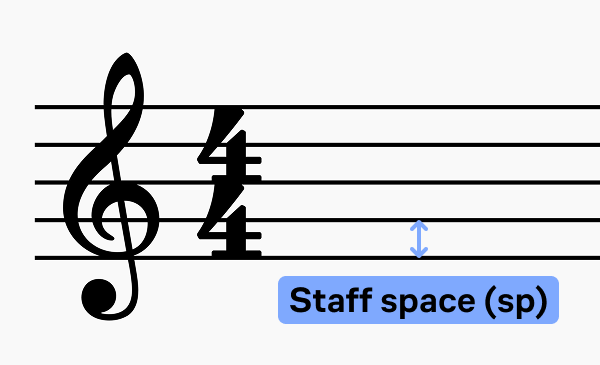
The size of everything on a score, such as staves, note heads, note stems, accidentals, and clefs uses a basic unit of measurement called **staff space** (or **sp** for 'spatium') to maintain correct proportions.
One **sp** is defined as the standard vertical distance between the midpoints of two lines of a music staff (or one quarter of vertical dimension of a full five-line staff, assuming a hypothetical staff line thickness of 0).
When you create a new score, MuseScore tries to adjust the staff space automatically so that the staves all fit on the page initially.
For most new scores, the default is 1sp = 1.75mm (or 0.069in), which results in a staff height of 7mm (or 0.276in). This is a good staff height for most solo music, choral music, small ensemble scores, and individual parts. Lead sheets and children's music may benefit from a larger staff size. Large ensemble scores may often require a smaller staff size in order to fit all instruments on the page. You may need to adjust this value further as you add music, if auto-place results in additional space being added between staves in order to avoid collisions.
To change the size of **staff space**:
1. Go to **Format -> Page settings**.
2. Adjust **Staff space (sp)** in the **Scaling** section.
See [Score size and spacing](/fi/formatting/score-size-and-spacing.md) for more information.
### Staff
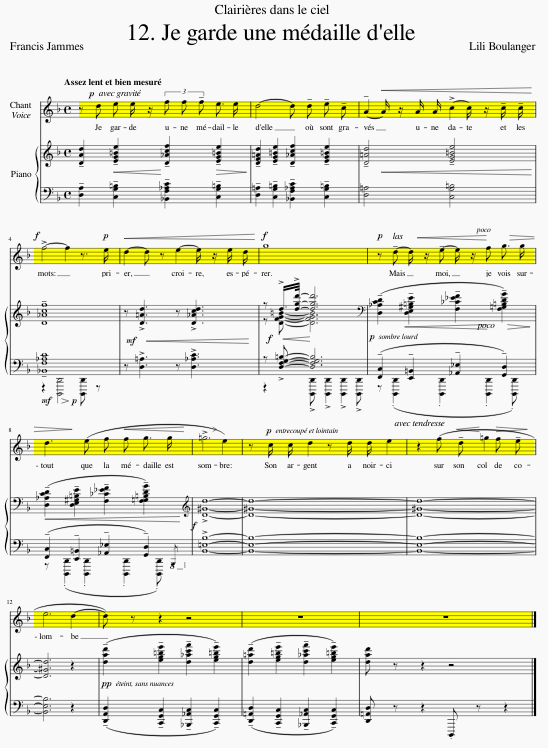
A **staff** (or plural, **staves**) is the set of lines and spaces on which notes are written. [Instruments](/fi/basics/setting-up-your-score.md#instruments) are made up of one or more staves. When the term staff is used in MuseScore, it refers to that single set of lines and spaces for a given instrument throughout an entire score. In the following score for voice and piano, everything marked in yellow constitutes a single staff – the staff for the voice:
### Grand staff
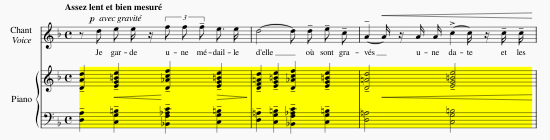
In music for piano and certain other instruments, two staves are used – one primarily for the right hand, the other for the left. This set of two staves is normally connected by curly braces and is referred to as a **grand staff**. In the following excerpt, the portion marked in yellow is a grand staff:
### System
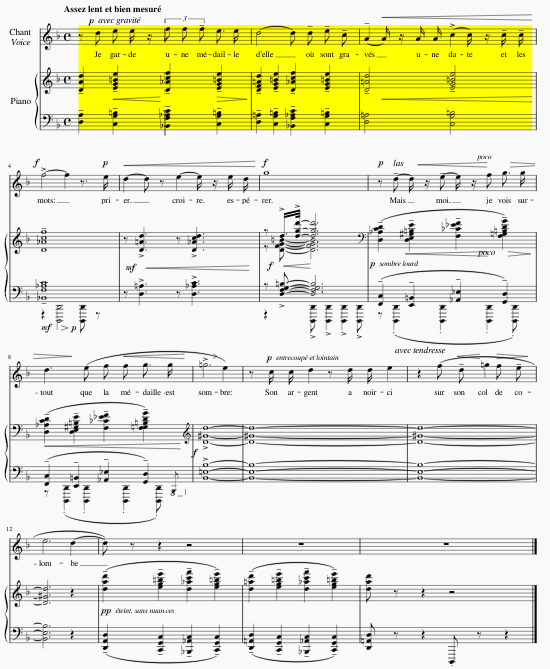
Kuten tekstiä, musiikkia luetaan vasemmalta oikealle ja ylhäältä alas. Jokaista sivun poikki kulkevaa musiikkilinjaa kutsutaan **viivastoryhmäksi**, ja se sisältää kaikkien soittimien nuottiviivastot ja ”pianoviivastot”. Seuraavassa esimerkissä keltaisella korostettu alue edustaa yhtä viivastoryhmää:
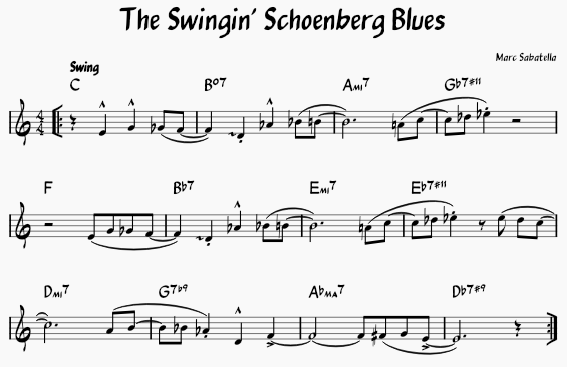
Vaikka partituurissa olisi vain yksi nuottiviivasto yhdelle soittimelle, kutsumme silti jokaista sivun poikki kulkevaa musiikkilinjaa viivastoryhmäksi. Seuraavassa esimerkissä on pelkästään yksi nuottiviivasto, mutta silti tämä lead sheet edustaa kolmea viivastoryhmää:
### Frame
Most text in notated music is associated with specific notes or measures. However, you may also need to place text that is not associated with a specific note or measure – the title at the beginning of a score, lyric verses placed at the end of a score, explanatory information placed between systems or even between measures. MuseScore uses elements called [**frames**](/fi/formatting/using-frames-for-additional-content.md) for this. There are vertical, text, and horizontal frames – each optimized for a particular type of use. Horizontal frames can also be used to create separation between measures on a system, with or without associated text.
### Margin
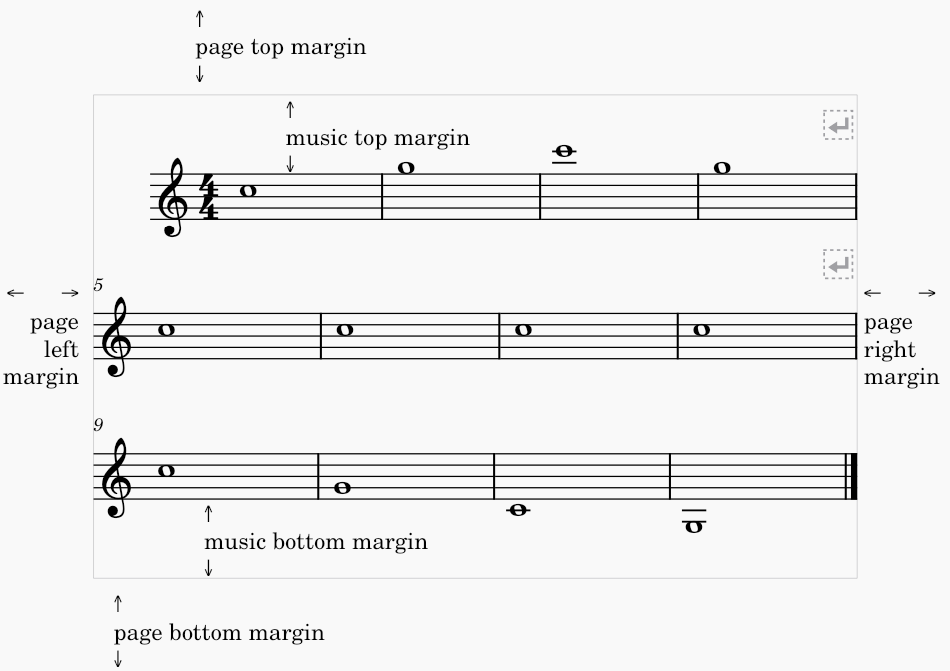
Marginaali on alue, jolle MuseScore ei tavallisesti sijoita musiikkia tai muita elementtejä. Sivun marginaali tarkoittaa sivun kaikkia neljää reunaa ympäröivää aluetta, jonne elementtejä ei sijoiteta. Musiikin marginaali puolestaan on ylä- ja alamarginaalin sekä ensimmäisen ja viimeisen nuottiviivaston väliin jäävä tila. Itse nuottiviivastoja ei sijoiteta näihin marginaaleihin, mutta niiden ylä- tai alapuolella olevat nuotit ja muut merkinnät voivat ulottua niihin.
Margins are adjusted in [**page settings**](/fi/formatting/score-size-and-spacing.md#page-and-margin-sizes).
---
# Agent Instructions
This documentation is published with GitBook. GitBook is the documentation platform designed so that both humans and AI agents can read, navigate, and reason over technical content effectively. Learn more at gitbook.com.
## Querying This Documentation
If you need additional information that is not directly available in this page, you can query the documentation by asking a question.
Perform an HTTP GET request on the following URL with the `ask` and `goal` query parameters:
```
GET https://handbook.musescore.org/fi/formatting/page-layout-concepts.md?ask=&goal=
```
`ask` is the immediate question: it should be specific, self-contained, and written in natural language.
`goal` is what the user is ultimately trying to achieve, the reason they need the answer. Sharing it helps GitBook give you a better, more relevant answer. A goal is most helpful when it describes the outcome the user wants rather than restating the question. For example, with `ask=how do I create an API token`, a goal like `automate deployments from our CI pipeline` lets GitBook tailor the answer to that use case.
The response will contain a direct answer to the question and relevant excerpts and sources from the documentation.
Use this mechanism when the answer is not explicitly present in the current page, you need clarification or additional context, or you want to retrieve related documentation sections.