> For the complete documentation index, see [llms.txt](https://handbook.musescore.org/llms.txt). Markdown versions of documentation pages are available by appending `.md` to page URLs; this page is available as [Markdown](https://handbook.musescore.org/es/formatting/using-sections-for-multiple-movements-or-songs.md).
# Uso de secciones para múltiples movimientos o canciones
## Overview
A **section break** is used to divide a score into separate sections, such as might be required in a musical suite, for example.
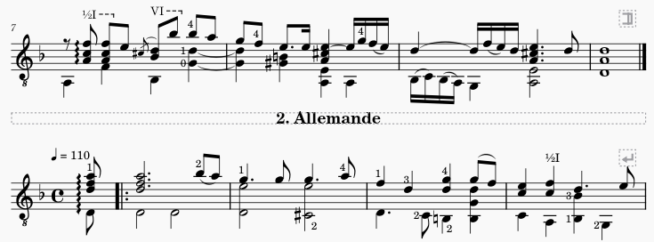
In the following score example, there is a section break at the end of the first system, followed by a text [frame](/es/formatting/using-frames-for-additional-content.md) providing the title of the next movement.
### Features
A section break has the following features:
* The measure after the point of application is forced to start a new system (like a [system break](/es/formatting/systems-and-horizontal-spacing.md#system-breaks))
* An adjustable playback pause between movements
* An option to restart measure numbering
* An option to display long instrument names (as you might at the start of a piece).
These options are detailed in [Section break properties](#section-break-properties) (below).
### Time and key signatures
If the beginning of a new section is accompanied by a change of time or key signatures, there will be no courtesy signature at the end of the previous section.
## Adding section breaks
To add a section break, select a measure, barline (or any element within the measure), then click the **Section break** icon in the **Layout** palette. You can substitute the latter action with a custom shortcut if desired (see [Preferences: Shortcuts](/es/customization/preferences.md#shortcuts)).
## Section break properties
The following properties of section breaks are adjustable from the **Section** break part of the **Properties** panel:
### Pause
To adjust the playback **pause** after a section break: select the break and edit “Pause before new section starts”.
### Instrument names
To display the **long intrument names** on the first system after a section break: select the break and make sure that “Start new section with long instrument names” is checked.
### Bar numbers
To **restart measure numbering** after a section break: select the break and make sure that “Reset bar numbers for new section” is checked.
Additional settings for measure number display are available in the [Measure properties](/es/notation/rhythm-meter-and-measures/measure-properties.md) dialog.
---
# Agent Instructions
This documentation is published with GitBook. GitBook is the documentation platform designed so that both humans and AI agents can read, navigate, and reason over technical content effectively. Learn more at gitbook.com.
## Querying This Documentation
If you need additional information that is not directly available in this page, you can query the documentation dynamically by asking a question.
Perform an HTTP GET request on the current page URL with the `ask` query parameter, and the optional `goal` query parameter:
```
GET https://handbook.musescore.org/es/formatting/using-sections-for-multiple-movements-or-songs.md?ask=&goal=
```
`ask` is the immediate question: it should be specific, self-contained, and written in natural language.
`goal` is optional and describes the broader end goal you are ultimately trying to accomplish on behalf of the user. GitBook uses it to tailor the answer towards what is most useful for that goal.
The response will contain a direct answer to the question and relevant excerpts and sources from the documentation.
Use this mechanism when the answer is not explicitly present in the current page, you need clarification or additional context, or you want to retrieve related documentation sections.