# Jumps and markers

Jumps and markers are used to create repeat structures in a score. They can be found in the **Repeats & jumps** palette.

## Types of jumps and markers

### Jumps

Jumps are items that indicate a jump from one point in the score to somewhere else.

<table><thead><tr><th width="140.49609375"></th><th></th></tr></thead><tbody><tr><td><strong>D.C.</strong></td><td>Repeat from the beginning (stands for for <em>da capo</em>).</td></tr><tr><td><strong>D.S.</strong></td><td>Repeat from the segno marker (stands for <em>dal segno</em>).</td></tr><tr><td><strong>D.C. al Fine</strong></td><td>Repeat from the beginning until 'Fine'.</td></tr><tr><td><strong>D.S. al Fine</strong></td><td>Repeat from the segno marker until 'Fine'.</td></tr><tr><td><strong>D.C. al Coda</strong></td><td>Repeat from the beginning until 'To Coda', then jump to the coda.</td></tr><tr><td><strong>D.S. al Coda</strong></td><td>Repeat from the segno marker until 'To Coda', then jump to the coda.</td></tr></tbody></table>

### Markers

Markers are labelled positions in the score. **Coda** and **segno** markers indicate the destination of a jump:

<table><thead><tr><th width="139.99609375"></th><th></th></tr></thead><tbody><tr><td><strong>Coda</strong></td><td><p><picture><source srcset="https://3437726813-files.gitbook.io/~/files/v0/b/gitbook-x-prod.appspot.com/o/spaces%2FhlQyZtOnJ5I68XsXPBVv%2Fuploads%2Fgit-blob-d3b392aa6285962a9f0cae01ea05bad07415d598%2Fcoda-white.svg?alt=media" media="(prefers-color-scheme: dark)"><img src="https://3437726813-files.gitbook.io/~/files/v0/b/gitbook-x-prod.appspot.com/o/spaces%2FhlQyZtOnJ5I68XsXPBVv%2Fuploads%2Fgit-blob-a721c3db647bdc760637a4ac2e4d210d49c8646b%2Fcoda-black.svg?alt=media" alt="Coda sign, which looks like an O with a plus sign drawn over it." data-size="line"></picture></p><p> (with or without additional text)</p></td></tr><tr><td><strong>Segno</strong></td><td><picture><source srcset="https://3437726813-files.gitbook.io/~/files/v0/b/gitbook-x-prod.appspot.com/o/spaces%2FhlQyZtOnJ5I68XsXPBVv%2Fuploads%2Fgit-blob-b0ee1981ceb353b7ad1bef5de2554b7f3a8c75a4%2Fsegno-white.svg?alt=media" media="(prefers-color-scheme: dark)"><img src="https://3437726813-files.gitbook.io/~/files/v0/b/gitbook-x-prod.appspot.com/o/spaces%2FhlQyZtOnJ5I68XsXPBVv%2Fuploads%2Fgit-blob-7091ee3aa9b7288599bdfd9c26d98cecfe2a3523%2Fsegno-black.svg?alt=media" alt="Segno sign." data-size="line"></picture></td></tr></tbody></table>

**Fine** and **To Coda** indicate the place where something should happen *after* a jump has been made:

<table><thead><tr><th width="140.3046875"></th><th></th></tr></thead><tbody><tr><td><strong>Fine</strong></td><td>End the piece or section. This <em>must</em> be used together with a 'D.C. al Fine' or 'D.S. al Fine'.</td></tr><tr><td><strong>To Coda</strong></td><td>Jump to the coda. This <em>must</em> be used together with a 'D.C. al Coda' or 'D.S. al Coda'.</td></tr></tbody></table>

{% hint style="info" %}
Though the \*\*'To Coda'\*\* item is effectively both a marker \_and\_ a jump, internally it is treated as a marker and has the corresponding properties. The destination of the jump to the coda is specified in the 'D.C. al Coda' or 'D.S. al Coda' item (see \[#jump-properties]\(%1), below).
{% endhint %}

## Adding a jump or marker

To add a jump or marker to your score:

1. Select a measure, or an item within the measure.
2. Click the desired item in the **Repeats & jumps** palette.

Alternatively, drag an item from the palette and drop it onto the measure.

Coda and segno are placed at the beginning of the measure, and all other jumps and markers at the end.

## Changing appearance of jumps and markers

Jumps and markers are text, so they are edited like any other text objects.

Markers often also contain music symbols (e.g. for segno and coda), which are taken from the musical text font the score is using. The size and alignment of these symbols can be controlled independently of the rest of the text in their properties.

To enter music symbols into these items, use the **Special characters** dialog (**Properties -> Text -> Insert special characters**).

## Changing playback of jumps and markers

#### Using labels to define the flow of playback

Jumps and markers are connected using **labels**, which are simple text identifiers that define the flow of playback. For most scores, you should not need to change the default labels of jumps and markers that are added from palettes. See #example-of-how-labels-control-playback-flow.

To indicate the beginning or end of the score, this specific syntax must be used:

* `start` is the beginning of the score or section.
* `end` is the end of the score or section.

Otherwise, the labels can be whatever you like, as long as they match up correctly. If you are creating more elaborate structures than the defaults allow, you can customize them in properties.

{% hint style="info" %}
Labels do not display on the score and have no inherent relationship to the text that the item on the score may contain.
{% endhint %}

#### Ignoring jumps and markers in playback

To ignore repeats, jumps, and markers in playback:

1. In the playback toolbar, open the cog menu
2. Uncheck **Play repeats**

## Jump properties

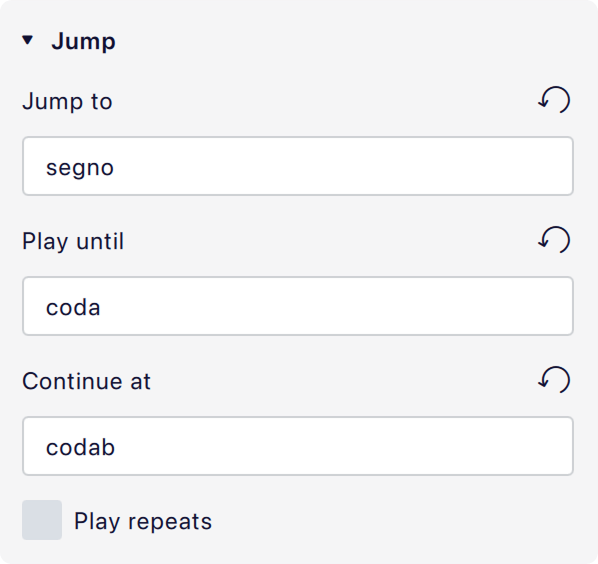
<figure><picture><source srcset="https://3437726813-files.gitbook.io/~/files/v0/b/gitbook-x-prod.appspot.com/o/spaces%2FhlQyZtOnJ5I68XsXPBVv%2Fuploads%2Fgit-blob-cefd82ad4af23dc9275104ebc1e8a187e3aeb500%2Fjump_properties-dark.png?alt=media" media="(prefers-color-scheme: dark)"><img src="https://3437726813-files.gitbook.io/~/files/v0/b/gitbook-x-prod.appspot.com/o/spaces%2FhlQyZtOnJ5I68XsXPBVv%2Fuploads%2Fgit-blob-948f79aed292398562fb5b2db8975dc47b13a018%2Fjump_properties-light.png?alt=media" alt="" width="299"></picture><figcaption><p>Default settings for 'D.S. al Coda'</p></figcaption></figure>

* **Jump to:** The label of the marker that playback should jump to, once this jump is reached.
* **Play until:** The label of the marker where playback should continue until.
* **Continue at:** The label of the marker to jump to once the label specified in **Play until** is reached. If this field is blank, playback will stop at the **Play until** label.
* **Play repeats:** Whether to play repeats after the jump happens.

#### Example of how labels control playback flow

The image above shows the default settings for a 'D.S. al Coda'. It describes that the following should happen once it is reached:

1. Jump to the marker with the label `segno` (which is the default label of the segno item from the palette).
2. Play from that label until the marker with the label `coda` (which is the default label of the 'To Coda' item from the palette).
3. Then jump to the marker with the `codab` (which is the default label of the coda item from the palette).

Since **Play repeats** is unchecked, any repeats encountered after the initial jump will be ignored.

## Marker properties

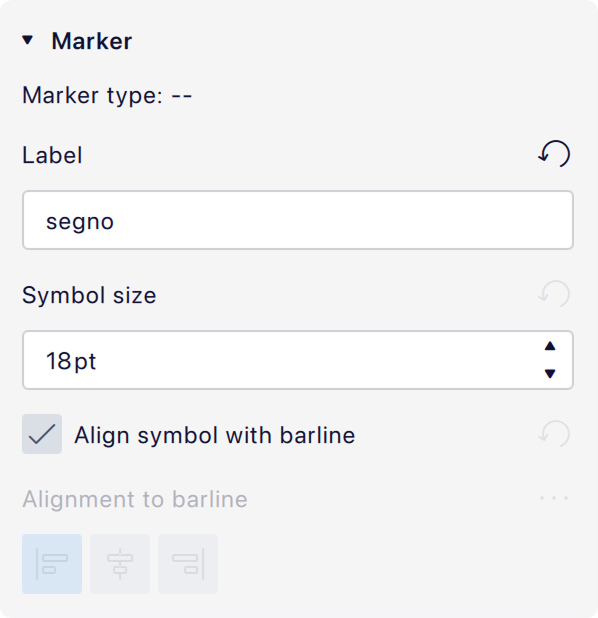
<figure><picture><source srcset="https://3437726813-files.gitbook.io/~/files/v0/b/gitbook-x-prod.appspot.com/o/spaces%2FhlQyZtOnJ5I68XsXPBVv%2Fuploads%2Fgit-blob-45f211e131d7e761d92f18e54c67ae6bbd186d0e%2Fmarker_properties-dark.png?alt=media" media="(prefers-color-scheme: dark)"><img src="https://3437726813-files.gitbook.io/~/files/v0/b/gitbook-x-prod.appspot.com/o/spaces%2FhlQyZtOnJ5I68XsXPBVv%2Fuploads%2Fgit-blob-0a1c3ac3203728e223fea53f7b144709c6d5488f%2Fmarker_properties-light.png?alt=media" alt="" width="299"></picture><figcaption><p>Default settings for 'Segno'</p></figcaption></figure>

* **Marker type:** The type of marker (non-editable).
* **Label:** The marker's label. This should match one of the labels referenced in a jump, according to what purpose the marker serves.
* **Symbol size:** The size in points of any musical symbols (coda, segno, etc.) used as part of the text on the score.
* **Align symbol with barline:** If checked, and if the item contains a symbol, the entire item will be positioned such that the symbol is centered over the barline. If unchecked, the alignment buttons below become enabled and the desired alignment can be chosen.

## Jump and marker style

The text styles for repeats and jumps can be configured in **Format -> Style -> Text styles -> Repeat text left** and **Repeat text right**. The **Repeat text left** style is used for markers which go at the start of the bar (coda, segno), and the **Repeat text right** style is used for markers which go at the end (everything else).

The musical text font, used for the symbols, can be changed in **Format -> Style -> Score -> Musical text font**.