> For the complete documentation index, see [llms.txt](https://handbook.musescore.org/llms.txt). Markdown versions of documentation pages are available by appending `.md` to page URLs; this page is available as [Markdown](https://handbook.musescore.org/en_gb/notation/expressive-markings/grace-notes.md).
# Grace notes
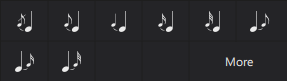
Grace notes can be applied to the score from the **Grace notes** palette.
For bagpipe players there is a comprehensive range of grace notes in the **Bagpipe embellishments** palette.
## Types of grace notes
Grace notes are small (cue-size) notes which ornament a previous or following note. They take their value from this parent note but do not themselves count towards the measure duration.
There are several kinds:
* **Acciaccatura**:
Usually written with an oblique stroke through the note flag, or through the beam, if there is a beamed series.
* **Appoggiatura**:
A stressed note which takes half the value from the parent note.
* **Grace note after** (trill endings).
## Adding a grace note to your score
**Note:** For standard staves *and* tablature, the following instructions for adding grace notes work in both note input *and* normal modes.
### Add grace note with keyboard shortcut
1. Ensure that the "parent" note is selected (multiple selection is possible in normal mode)
2. To apply an acciaccatura, press `/` (slash).
You can create a custom shortcut for other types of grace notes if you wish (see Preferences: Shortcuts).
### Add grace note from palette
1. Ensure that the "parent" note is selected (multiple selection is possible in normal mode)
2. Click on the desired symbol in the **Grace notes** palette.
Alternatively, you can drag and drop a grace note from the palette onto a note in the score.
## Multiple grace notes
### Sequential grace notes
You can add a run of grace notes to a selected note by repeatedly doing any of the following:
* pressing the relevant keyboard shortcut (see above)
* clicking on a grace note icon in a palette
* dragging and dropping a grace note from a palette onto a note.
### Grace note chords
To input a chord of grace notes:
1. Add a single grace note (as described above)
2. For standard staves, use one of the following methods:
* Press `Shift` and a note letter, `A` to `G`; this will add the corresponding note above
* Press `Alt`+`1`-`9`
* from the menu bar, select **Add -> Intervals** and choose an interval from the list. This will add a note at the indicated interval above the selected note.
3. **For tablature**, select the grace note in **normal mode**, then add further chord notes using the method of adding intervals in step 2.
## Editing grace notes
### Change duration
To edit the visual duration, click on the grace note in normal mode, and select a duration from the note input toolbar or by using a keyboard shortcut (see Selecting duration).
### Change pitch
On a standard stave, change the pitch of a grace note using one of the methods described in Editing notes and rests.
On tablature staves, use one of the methods described in Changing the pitch in normal mode (tablature).
## Grace note properties
The same properties are available for grace notes as for normal notes. See Notehead properties, Stem and flag properties.
To control whether a slash should be shown through the stem, there is one additional option for grace notes only
1. Select a grace note
2. Go to the **Properties** panel
3. Under **Note**, select the **Stem** tab
4. Toggle **Show stem slash**.
In the case of a beamed group, setting this for any note in the group will set it for the entire group.
## Grace note style
You can adjust the default size for all grace notes in **Format -> Styles -> Sizes -> Grace note size**.
{% hint style="info" %}
Note that \*\*Grace note size\*\* is independent from \*\*Small note size\*\*, which is the size used for cue-size notes; the two sizes are often the same, and they are in MuseScore Studio by default, but do not have to be.
{% endhint %}
---
# Agent Instructions
This documentation is published with GitBook. GitBook is the documentation platform designed so that both humans and AI agents can read, navigate, and reason over technical content effectively. Learn more at gitbook.com.
## Querying This Documentation
If you need additional information that is not directly available in this page, you can query the documentation dynamically by asking a question.
Perform an HTTP GET request on the current page URL with the `ask` query parameter, and the optional `goal` query parameter:
```
GET https://handbook.musescore.org/en_gb/notation/expressive-markings/grace-notes.md?ask=&goal=
```
`ask` is the immediate question: it should be specific, self-contained, and written in natural language.
`goal` is optional and describes the broader end goal you are ultimately trying to accomplish on behalf of the user. GitBook uses it to tailor the answer towards what is most useful for that goal.
The response will contain a direct answer to the question and relevant excerpts and sources from the documentation.
Use this mechanism when the answer is not explicitly present in the current page, you need clarification or additional context, or you want to retrieve related documentation sections.