> For the complete documentation index, see [llms.txt](https://handbook.musescore.org/llms.txt). Markdown versions of documentation pages are available by appending `.md` to page URLs; this page is available as [Markdown](https://handbook.musescore.org/en_gb/basics/input-by-duration-mode.md).
# Input by duration mode
{% hint style="info" %}
This page explains music creation on standard staves. See also the \[tablature]\(%1) and \[percussion]\(%2) pages.
{% endhint %}
## Quickstart
To enter notes using **Input by duration** mode:
1. Type `M` to enter Input by duration mode
2. Type `A`, `B`, `C`, `D`, `E`, `F`, or `G` to select a pitch
3. Press a duration in the toolbar or type a duration shortcut (`1`–`9`) to enter a note
## Entering notes
{% hint style="info" %}
MuseScore Studio's default note entry method is \[\*\*Input by note name\*\*]\(%1). If you'd prefer to choose the pitch first and then enter notes into your score by pressing the duration shortcuts or buttons in the toolbar, \*\*Input by duration mode\*\* is for you.
{% endhint %}
### Selecting a start point
To add a note or rest to the score, start by selecting a location to begin entry. You can use the mouse or the keyboard navigation commands.
### Entering Input by duration mode
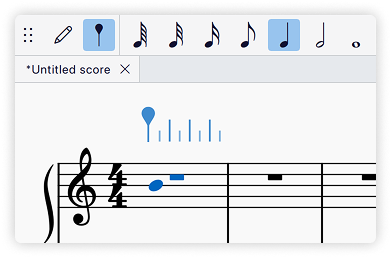
Press `M` to enter Input by duration mode or select the button in the toolbar.
### Selecting pitch
A preview of the next pitch to be entered is shown on the score in the colour of the currently selected [voice](/en_gb/basics/working-with-multiple-voices.md). On most instruments, this pitch cursor will fall on the middle stave line.
Enter pitches using the computer keyboard, mouse, MIDI keyboard, or virtual piano keyboard.
#### Selecting pitch using the computer keyboard
* Type `A`, `B`, `C`, `D`, `E`, `F`, or `G` to select a pitch by name.
* Use `↑` or `↓` to move the pitch cursor up or down by one stave line or space.
* Use `Ctrl` + `↑` or `Ctrl` + `↓` to move the pitch cursor up or down by one octave.
#### **Selecting pitch using the mouse**
Hovering over a stave and clicking enters a note at the cursor position. See the main [entering notes and rests](/en_gb/basics/entering-notes-and-rests.md#selecting-pitch-using-the-mouse) page for more details.
### Selecting duration
After selecting pitch using one of the methods above, press a duration in the toolbar or use a shortcut (`1`–`9`) to enter a note. See the list of duration shortcuts below:
## Entering chords
For the purpose of this section, chords are any combination of multiple notes all starting at the same time, all sharing the same duration, and all sharing a single stem.
#### To create chords as you enter notes
* **Computer keyboard**: Hold `Shift` while entering the note using `A`–`G`
* The next note will be added above the last note added, so when building a chord it's easiest to start by entering the lowest note first.
* **Mouse**: Click the location where you wish to add the note
* **MIDI keyboard**: Either play all the notes at the same time, or play them one at a time but do not release one key before pressing the next, then select a duration
* **Virtual piano keyboard**: Hold `Shift` while clicking a key in the piano panel
You can also add notes to chords by interval.
#### To create chords over a previously-entered line of notes
Notes entered in **Input by duration** mode that match the duration at the cursor position will form a chord with the existing note rather than overwriting them. There's no need to hold `Shift`.
So, use `←` or `→` to move the entry cursor to any location where a note already exists, select a pitch, then enter the corresponding duration to create or add to a chord.
## Preferences
In **Preferences → Note input**, you can further customise Input by duration mode.
* **Default input mode**: Choose whether **Input by note name mode** or **Input by duration mode** is entered when entering a note or double-clicking on a stave.
* **Input by duration mode cursor**: Choose whether to show the above stave ruler or the classic note entry cursor when in Input by duration mode.
---
# Agent Instructions
This documentation is published with GitBook. GitBook is the documentation platform designed so that both humans and AI agents can read, navigate, and reason over technical content effectively. Learn more at gitbook.com.
## Querying This Documentation
If you need additional information that is not directly available in this page, you can query the documentation by asking a question.
Perform an HTTP GET request on the following URL with the `ask` and `goal` query parameters:
```
GET https://handbook.musescore.org/en_gb/basics/input-by-duration-mode.md?ask=&goal=
```
`ask` is the immediate question: it should be specific, self-contained, and written in natural language.
`goal` is what the user is ultimately trying to achieve, the reason they need the answer. Sharing it helps GitBook give you a better, more relevant answer. A goal is most helpful when it describes the outcome the user wants rather than restating the question. For example, with `ask=how do I create an API token`, a goal like `automate deployments from our CI pipeline` lets GitBook tailor the answer to that use case.
The response will contain a direct answer to the question and relevant excerpts and sources from the documentation.
Use this mechanism when the answer is not explicitly present in the current page, you need clarification or additional context, or you want to retrieve related documentation sections.