> For the complete documentation index, see [llms.txt](https://handbook.musescore.org/llms.txt). Markdown versions of documentation pages are available by appending `.md` to page URLs; this page is available as [Markdown](https://handbook.musescore.org/en_gb/about-the-handbook.md).
# About the handbook
## MuseScore versions covered
This handbook is valid for **MuseScore Studio version 4.0 and above**.
If you're using a different version of the program, please consult the appropriate handbook for your version:
* [MuseScore 3 Handbook](https://handbook.musescore.org/3/)
* [MuseScore 2 Handbook](https://musescore.org/en/handbook/2)
* [MuseScore 1 Handbook](https://musescore.org/en/handbook/1)
## Exploring the handbook
### Browsing chapters
Use the chapter links on the main page to explore content in each chapter of the handbook.
There is also a single-page view of the entire handbook, which can be used with your browser's find-in-page facility (shortcut: `Ctrl`+`F`, or `Cmd`+`F` on macOS).
### Searching the handbook
To search the handbook, use the dedicated search field in the top right of each handbook page.
If you're not sure what to search for, try browsing the Glossary. It has pictures to help you to find things that you are unable to name.
You can also try a web search using this special syntax to only include results from MuseScore.org:
```
site:musescore.org your topic here
```
This works with most search engines. For example, perform a Google search for "`site:musescore.org tempo markings`".
If you still can't find the information you need, please ask for help in the Support Forum.
### Reading in a different language
The handbook is translated into several languages, although translations are not always up-to-date with the English version. Pages are translated individually, so not every page is available in every language.
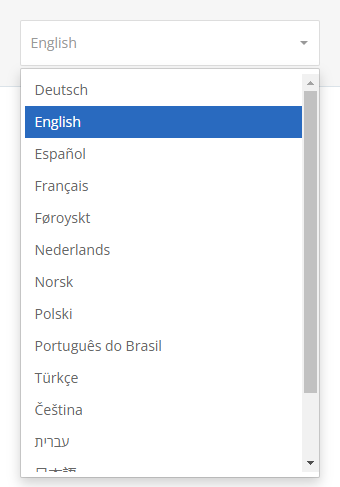
To read the handbook in a different language, use the languages dropdown displayed in the top right of each handbook page, directly below the Search field. If a particular language isn't available in the dropdown this means the page hasn't been translated into that language yet.
In case of doubt, please consult the English version of the handbook, or ask for help in one of the forums. Use the Support and bug reports forum if posting in English, otherwise use the appropriate forum for your language.
### Downloading the handbook
To save a copy of the handbook to your computer for offline viewing:
1. Visit the single-page view of the entire handbook.
2. Open your browser's **Print** facility (shortcut: `Ctrl`+`P`, or `Cmd`+`P` on macOS).
3. Choose the option labelled *Print to PDF*, *Save to PDF*, or similar.
* Make sure you are saving a file rather than printing a physical copy.
If you require a physical copy, it's best to follow the above steps to create a PDF, then check the PDF is formatted correctly before you proceed to print it with a real printer. The handbook is quite long, so please don't print a physical copy unless you really need to.
## Contributing to the handbook
The handbook is maintained and translated by the MuseScore community. If you'd like to help write content, please read Editing the handbook.
If you want to translate pages, please read How to translate the handbook.
---
# Agent Instructions
This documentation is published with GitBook. GitBook is the documentation platform designed so that both humans and AI agents can read, navigate, and reason over technical content effectively. Learn more at gitbook.com.
## Querying This Documentation
If you need additional information that is not directly available in this page, you can query the documentation by asking a question.
Perform an HTTP GET request on the following URL with the `ask` and `goal` query parameters:
```
GET https://handbook.musescore.org/en_gb/about-the-handbook.md?ask=&goal=
```
`ask` is the immediate question: it should be specific, self-contained, and written in natural language.
`goal` is what the user is ultimately trying to achieve, the reason they need the answer. Sharing it helps GitBook give you a better, more relevant answer. A goal is most helpful when it describes the outcome the user wants rather than restating the question. For example, with `ask=how do I create an API token`, a goal like `automate deployments from our CI pipeline` lets GitBook tailor the answer to that use case.
The response will contain a direct answer to the question and relevant excerpts and sources from the documentation.
Use this mechanism when the answer is not explicitly present in the current page, you need clarification or additional context, or you want to retrieve related documentation sections.