> For the complete documentation index, see [llms.txt](https://handbook.musescore.org/llms.txt). Markdown versions of documentation pages are available by appending `.md` to page URLs; this page is available as [Markdown](https://handbook.musescore.org/de/notation/repeats/voltas.md).
# Volten
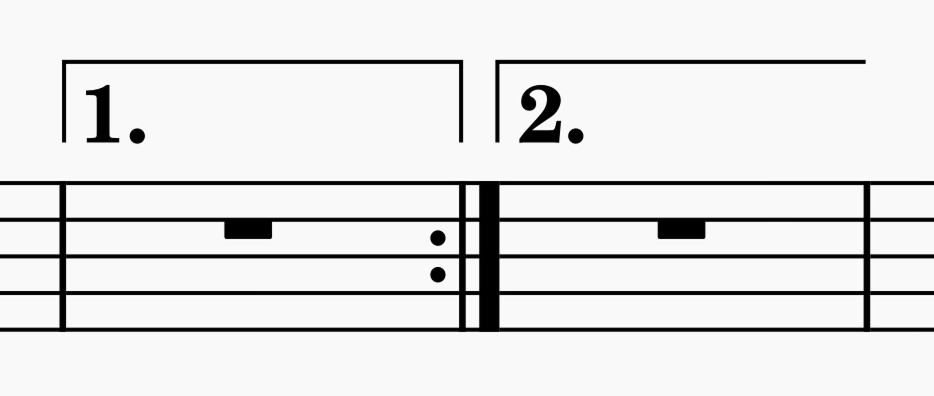
Volta brackets are lines above the staff used to mark different endings for a repeated section. MuseScore Studio creates correct playback. In the example below, the repeated section is played once through with the ending marked "1.", then a second time with the ending marked "2.".
## Adding voltas to your score
1. Make sure that [repeat barlines](/de/notation/repeats/repeat-signs.md#adding-repeat-signs-to-your-score) are in the correct position.
2. To apply the volta bracket, use one of the following:
* Select a measure and click on the desired volta in the **Repeats & jumps** palette, or
* Drag a volta from a palette onto a measure.
To change the range covered after the volta has been added, see [#changing-the-range-of-a-line](/de/basics/adjusting-elements-directly.md#changing-the-range-of-a-line).
## Changing appearance of voltas
The appearance of voltas can be changed via the **Properties** panel. See [#volta-properties](#volta-properties), below. Note that changing the text is purely visual and does not affect playback.
## Changing playback of voltas
1. Select a volta in the score.
2. Go the **Properties** panel and find the **Volta** section.
3. Select the **Style** tab and edit the **Repeat list** value.
The **Repeat list** specifies which times through the music under the volta should be played. For example, a value of `1` means that the passage will be played only the first time, and will be skipped other times. `2` means it will be played only the second time.
If the volta is to be played more than once, you can enter a series of numbers separated by commas, e.g. `1,2,3`. In this case, you must also edit the end repeat's **Play count** property accordingly. See [#changing-how-often-to-repeat](/de/notation/repeats/repeat-signs.md#changing-how-often-to-repeat). The play count is usually the number of **Repeat list** entries plus 1. For example:
This example plays back the measures in this sequence: 1–3, 1–2, 4–5, 1–3, 1–3, 1–2, 4–5, 1–2, 6–8.
To achieve this, the following properties are set:
* For Repeats:
* In measure 3, **Play count** is set to `4`
* In measure 5, **Play count** is set to `3`
* Voltas:
* In measure 3, **Repeat list** is set to `1,3,4` and **Beginning text** is set to `1., 3., 4.`
* In measures 4–5, **Repeat list** is set to `2,5` and **Beginning text** is set to `2., 5.`
* In measure 6, **Repeat list** is set to `6` and **Beginning text** is set to `6.`
{% hint style="info" %}
To ignore all repeats during playback, see \[#ignoring-repeat-signs-during-playback]\(repeat-signs.md#ignoring-repeat-signs-during-playback).
{% endhint %}
## Volta properties
In the properties panel, there are two tabs for voltas: **Style** and **Text**.
The only option specific to voltas is **Style -> Repeat list** which is used to specify which repeats the volta applies to. See [#changing-playback-of-voltas](#changing-playback-of-voltas), above.
For all the other options in **Style**, see [#line-properties](/de/notation/expressive-markings/other-lines.md#line-properties). For the options in Text, see [entering-and-editing-text.md](/de/text/entering-and-editing-text.md) and [formatting-text.md](/de/text/formatting-text.md).
## Voltas style
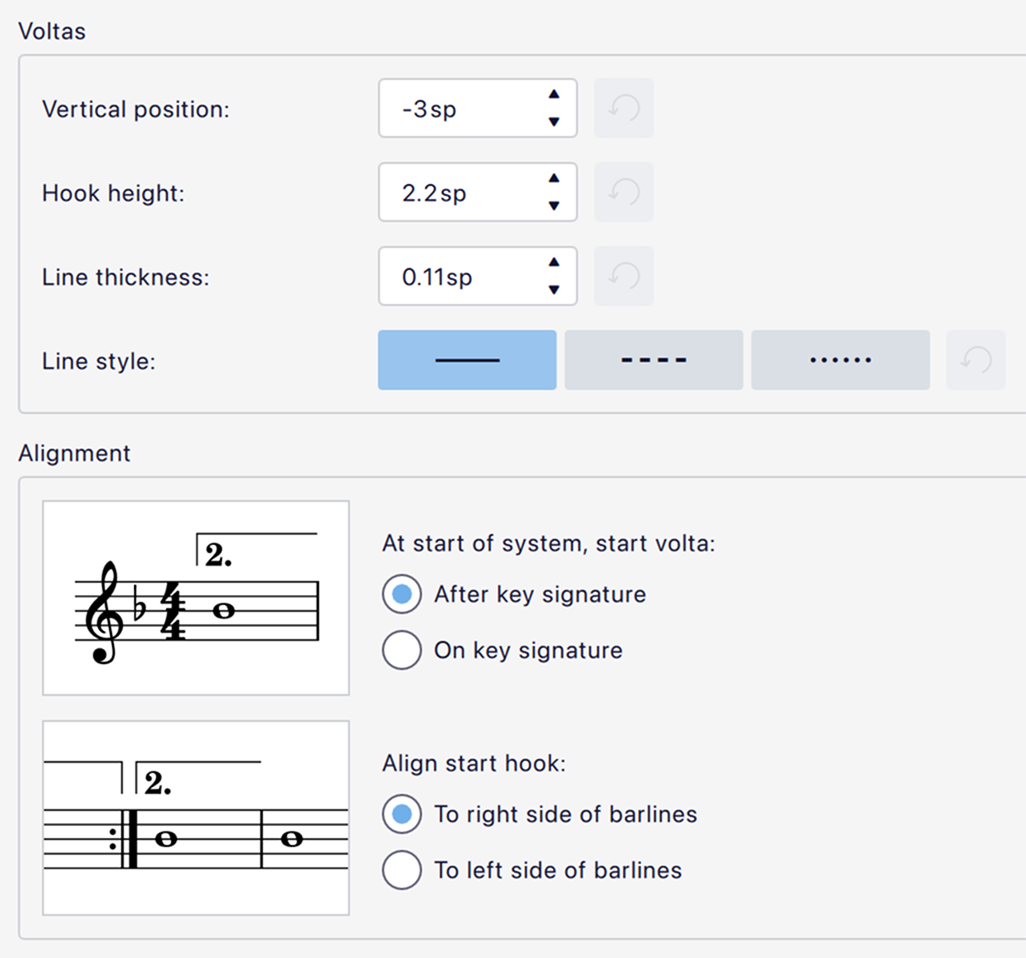
Styles for voltas can be found in **Format -> Style -> Voltas**:
* **Vertical position:** The default position of the horizontal line of the volta.
* **Hook height:** The height of the vertical hook (note that if this value is close to or larger than **Vertical position** then this will determine the position of the whole item, as it will automatically move up to avoid colliding with the staff).
* **Line thickness:** The thickness of the line.
* **Line style:** Solid, dashed or dotted.
There are two options to control the alignment of the beginning of the volta:
* **At start of system, start volta:** This controls whether the vertical hook should start after or on the key signature. Note that this affects also affects the continuation of a volta line when it continues to a new system.
* **Align start hook:** This controls whether the vertical hook should align to the left or right side of the thick barline in a repeat.
Styles for the text under voltas can be found in **Format -> Style -> Text styles** under **Volta**.
---
# Agent Instructions
This documentation is published with GitBook. GitBook is the documentation platform designed so that both humans and AI agents can read, navigate, and reason over technical content effectively. Learn more at gitbook.com.
## Querying This Documentation
If you need additional information that is not directly available in this page, you can query the documentation dynamically by asking a question.
Perform an HTTP GET request on the current page URL with the `ask` query parameter, and the optional `goal` query parameter:
```
GET https://handbook.musescore.org/de/notation/repeats/voltas.md?ask=&goal=
```
`ask` is the immediate question: it should be specific, self-contained, and written in natural language.
`goal` is optional and describes the broader end goal you are ultimately trying to accomplish on behalf of the user. GitBook uses it to tailor the answer towards what is most useful for that goal.
The response will contain a direct answer to the question and relevant excerpts and sources from the documentation.
Use this mechanism when the answer is not explicitly present in the current page, you need clarification or additional context, or you want to retrieve related documentation sections.